
Day Trade is the dedicated intraday product, with a maximum 240-minute horizon and no overnight carry.
Trading Terminal / How to use / Day Trade
Read the whole intraday trade before the session ends.
A screen-by-screen guide to preparation, entry, current risk, same-session management, strict newest-first ordering, charts, alerts and the one final record in Performance.
Same sessionNo overnight carry
Up to 240 minEarlier exits can win
Active riskCurrent level, time attached
One receiptVerified in Performance
Preparation badges are not positions. Once open, the latest managed-risk level matters more than an older screenshot.
Use the board for now, Alert Log for sequence, chart for context and Performance for the final receipt.
Day Trade / Product tour
Orient yourself on the loaded Day board.
The selected product, session banner, summary, refresh time, row state and chart control answer different questions. Read them in that order before you react to a price.
The real product surface
This loaded account-safe capture shows Day selected with its current board state. The top summary reports open and near counts; the table preserves recent closed rows so the latest intraday outcomes do not vanish the moment they finish.
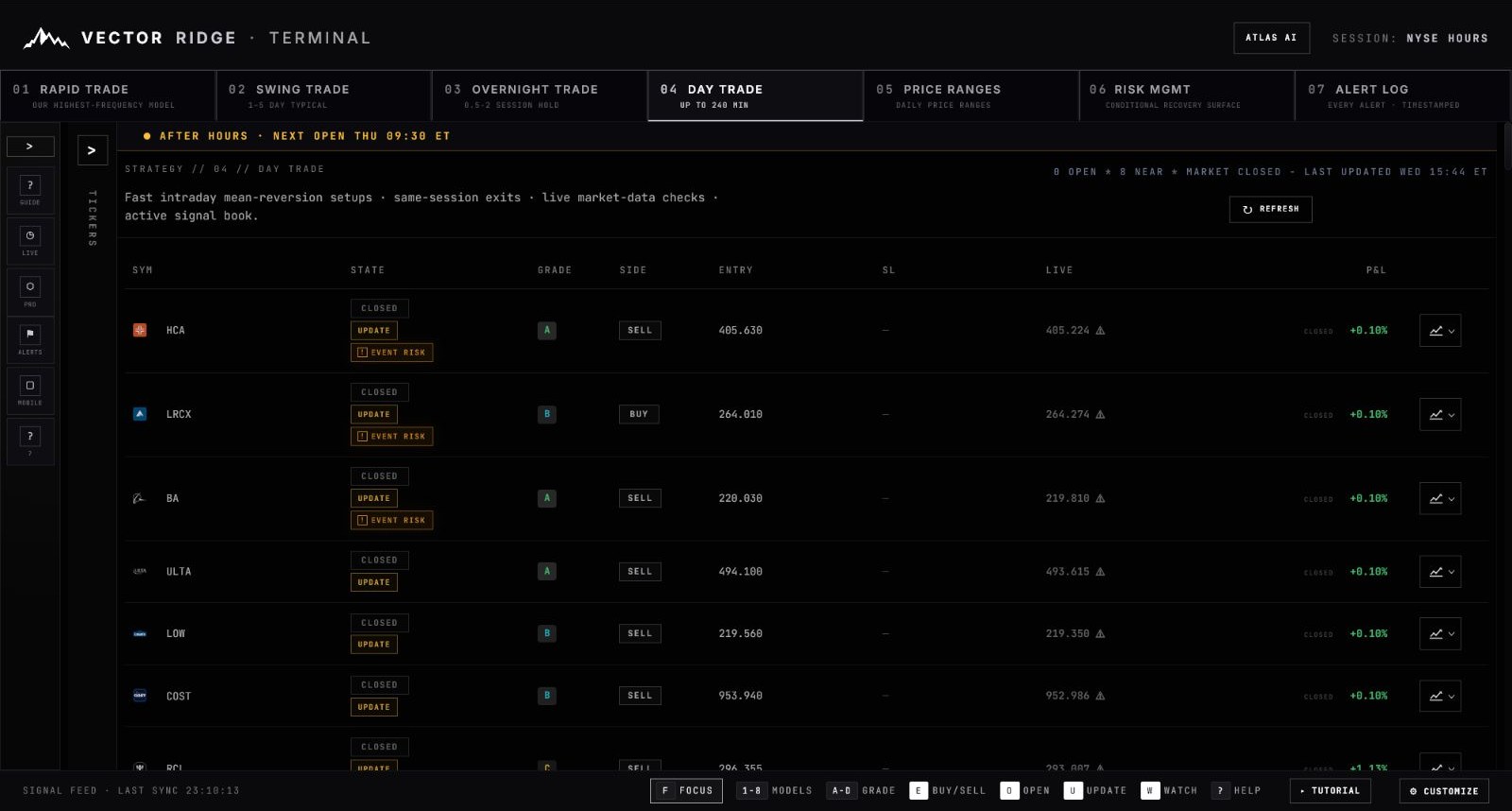
1The selected Day tab establishes the dedicated same-session product. It is not a generic filter over every Terminal trade.
2The market banner tells you whether the regular-hours session is open, pre-market, after-hours or closed.
3Open and near counts summarize the board. The refresh control requests the newest published data without changing product selection.
4Read the primary lifecycle badge first. UPDATED and EVENT RISK add context but do not replace OPEN or CLOSED.
5The right-edge chart control opens the exact selected trade; it is not a generic ticker chart detached from the record.
Use every screenshot for orientation, not current instructions. Prices, states and timestamps are frozen at capture time. The live Day board is the authority for what is active now.
Day Trade / Chapter 01
Know what Day Trade is built to do.
Day is the Terminal's dedicated same-session product. It is designed for a recorded intraday entry, active management and a close before overnight exposure begins.
Same-session identity
A Day trade begins and ends inside one regular-hours session. It is never carried overnight.
Maximum horizon
Up to 240 regular-hours minutes is the outer boundary, not a promised holding period.
Managed risk
SL is the current active managed-risk level and can change during an open trade.
One result
Whether also visible in Rapid or Alerts, the trade settles as one economic record in Performance.
Day is not Swing compressed into a shorter chart. Its product identity, same-session boundary, ordering and public lifecycle are distinct.
Day Trade / Chapter 02
Read one complete row from left to right.
The reliable sequence is symbol and product, primary state, context, grade, side, entry, current SL, live or closed reference, P&L, then chart.
This focused production crop compares two completed Day rows. It shows why a closed row remains useful: the final mark and result stay visible while the primary state clearly says the live lifecycle ended.

1The symbol identifies the company; the DAY badge identifies the native product and expected same-session contract.
2CLOSED is primary. UPDATE and EVENT RISK remain as historical context and do not make the trade active again.
3Grade records conviction at entry; BUY or SELL determines the return direction.
4Entry anchors the recorded trade. An open row would pair it with the current SL; a completed row can show a dash after risk ends.
5The muted final mark and CLOSED label distinguish the completed price from a changing live reference.
6Open the chart to reconcile entry, risk changes, close marker and timestamps for this exact row.
Field reference
| Field | What it answers | What not to assume |
|---|---|---|
| DAY badge | Does Day own this lifecycle? | Visibility in Rapid does not move ownership away from Day. |
| State | What is the newest public lifecycle status? | EVENT RISK or UPDATED is context, not a replacement primary state. |
| Grade | What conviction was recorded at entry? | Grade does not override the current risk level. |
| Side | Is the position BUY or SELL? | Do not infer direction from P&L color. |
| Entry | What published price anchors the trade? | ENTRY NEAR is preparation, not a completed entry. |
| SL | What active managed-risk level is current? | It is not a fixed lifetime value and is not a target. |
| Live / Closed | What mark is active now, or what close was recorded? | A delayed live reference is not a broker quote. |
| P&L | How is the trade performing relative to its recorded side? | Open P&L is not the final realized result. |
Day Trade / Chapter 03
Separate preparation from an active position.
WATCH and ENTRY NEAR help you prepare. BUY NOW or SELL NOW publishes the entry instruction; OPEN confirms an active record; CLOSED ends the lifecycle.
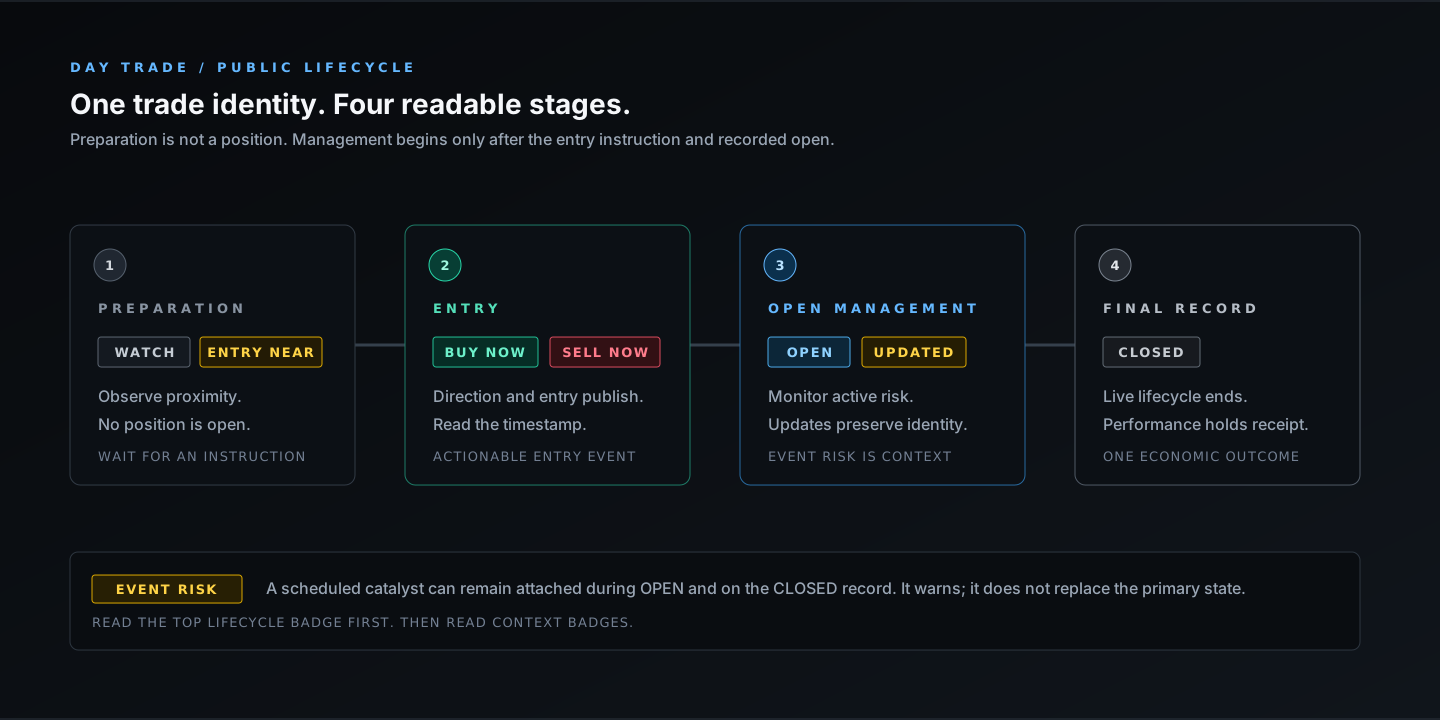
1WATCH and ENTRY NEAR are pre-trigger states. They can help you prepare, but there is no open position.
2BUY NOW or SELL NOW is the published entry instruction. Confirm side, price and time together.
3OPEN means a position record exists. UPDATED can tell you its active risk changed.
4CLOSED ends the live lifecycle. The final timestamped result belongs in Performance.
| Badge | Meaning | Your next check |
|---|---|---|
| WATCH | A setup is monitored but not actionable. | Wait for an entry instruction. |
| ENTRY NEAR | Price is close to a model entry. | Confirm distance and side; do not treat it as open. |
| BUY NOW / SELL NOW | The entry instruction is active. | Read the published entry and timestamp. |
| OPEN | The position has a recorded entry. | Monitor current SL, live mark and same-session clock. |
| UPDATED | A published managed field changed. | Inspect the yellow warning and chart timestamp. |
| EVENT RISK | A scheduled catalyst is attached. | Read the warning; the primary lifecycle remains authoritative. |
| CLOSED | The trade is no longer live. | Use Performance for the final receipt. |
Day Trade / Chapter 04
Your 60-second Day scan.
The workflow stays short because every deeper surface has a specific job: refresh, identify the newest state, read risk, then open evidence only where needed.
Open Day and press Refresh
Confirm session state, latest refresh time and the open/near summary before reading individual rows.
Start with BUY NOW and SELL NOW
These are fresh entry instructions. OPEN is active management; CLOSED is a retained receipt.
Confirm the DAY badge
Native Day ownership is explicit. Do not infer product membership from the ticker or where else the card appears.
Read side, entry and current SL
This gives you direction, the fixed trade anchor and the latest active risk level.
Check clock and context
Remember the 240-minute maximum, no overnight carry and any attached EVENT RISK warning.
Use the right evidence surface
Chart shows the selected record; Alert Log shows sequence; Performance resolves the close once.
Day Trade / Chapter 05
Treat SL as current active risk, not a permanent line.
Entry remains the published anchor. The active managed-risk level can change, so its value and update time must travel together. Day exposes no public fixed target.
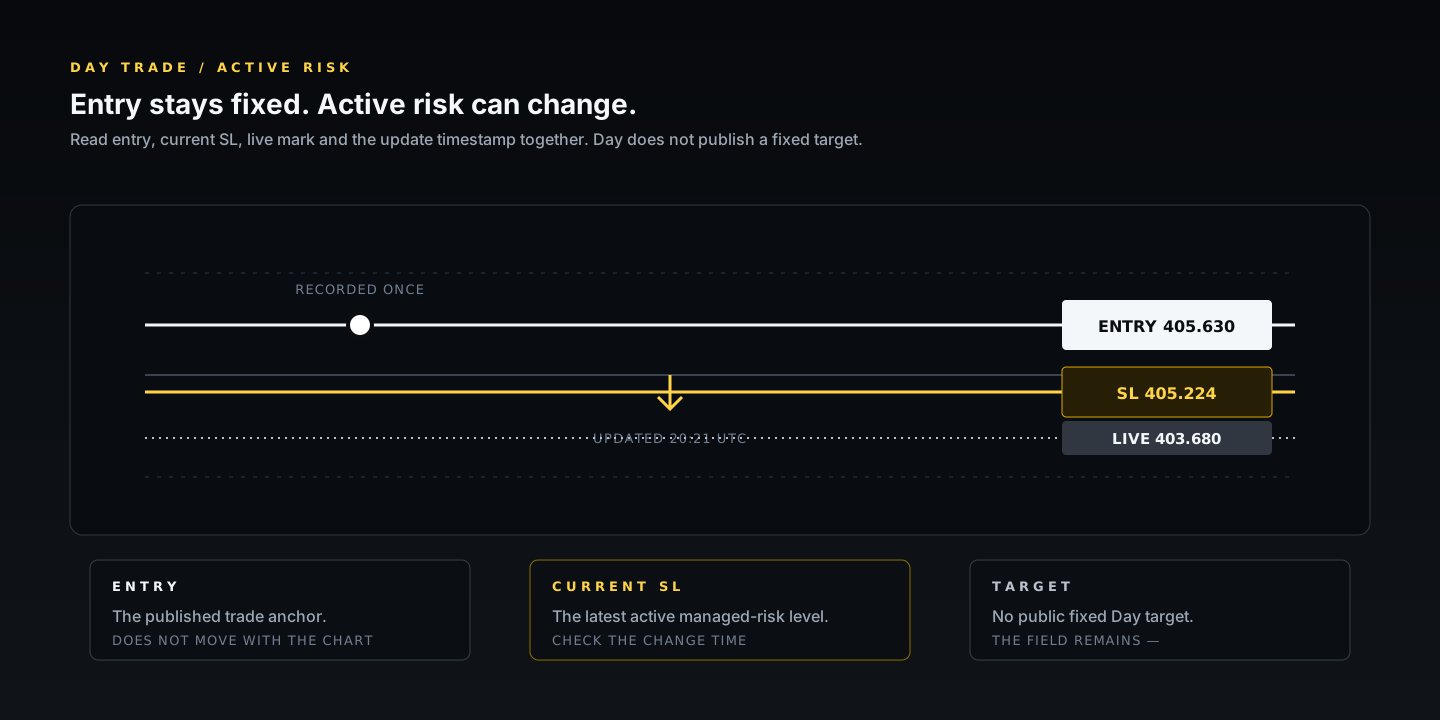
1Entry is recorded once and anchors the return. It does not slide to a more favorable later candle.
2SL is the current published managed-risk level. When it changes, the warning and update timestamp make that history visible.
3The live mark changes with the delayed reference feed. Read it with side before interpreting P&L.
4Day does not publish a fixed take-profit. A dash in Target is intentional, not missing data.
When the number changes, ask when. The chart and Alert Log should show the level-update time; an older screenshot is never proof of the current SL.
Day Trade / Chapter 06
Respect the earlier of risk, clock or session close.
Day can finish long before its maximum horizon. An earlier exit event wins; the outer limit is 240 regular-hours minutes, and the position never becomes an overnight hold.
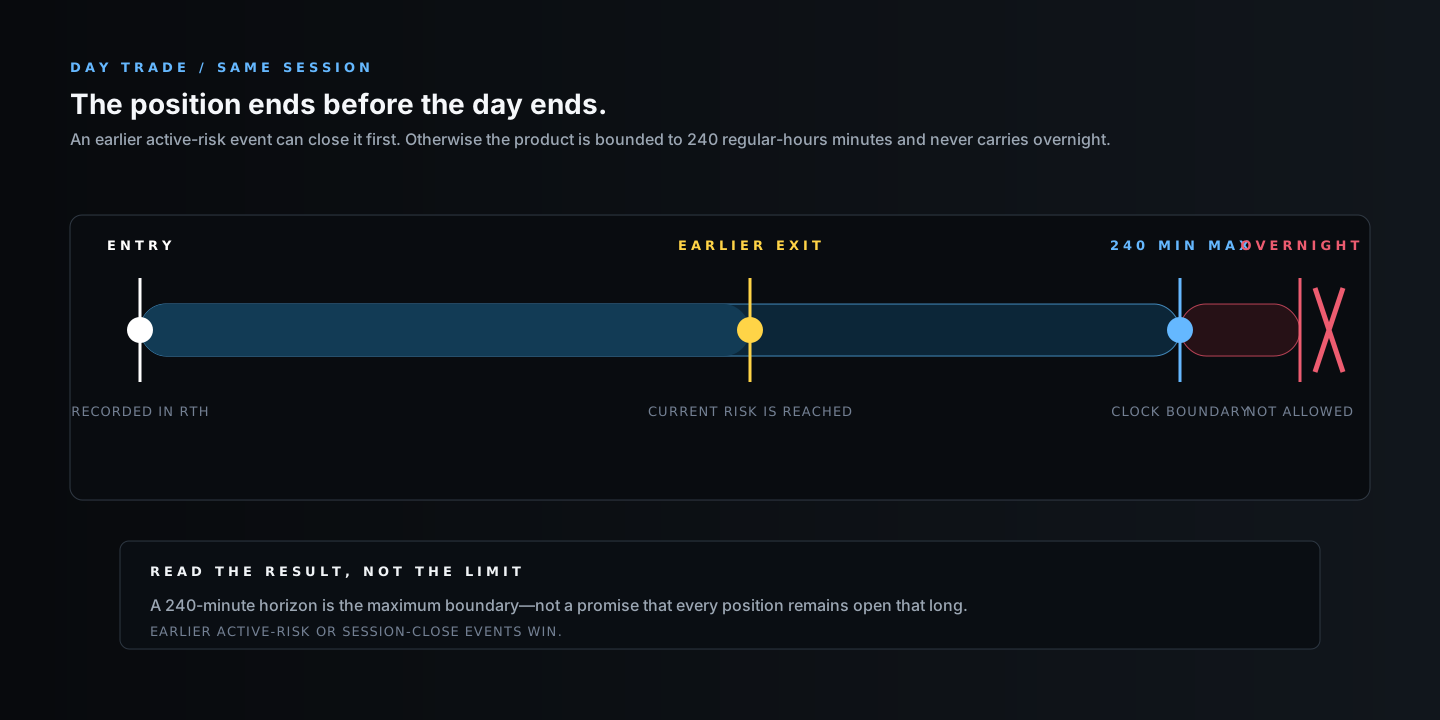
1The recorded entry starts the Day clock inside the regular-hours session.
2If active risk is reached first, the trade closes first. The maximum horizon does not delay that event.
3At most 240 regular-hours minutes can elapse from entry under the product horizon.
4No Day position carries overnight. Session close is a hard public product boundary.
Day Trade / Chapter 07
Follow strict newest-event chronology.
Day sorts lifecycle events newest first. It does not use Rapid's positive-live lift. WATCH and ENTRY NEAR remain in a separate bottom preparation partition.
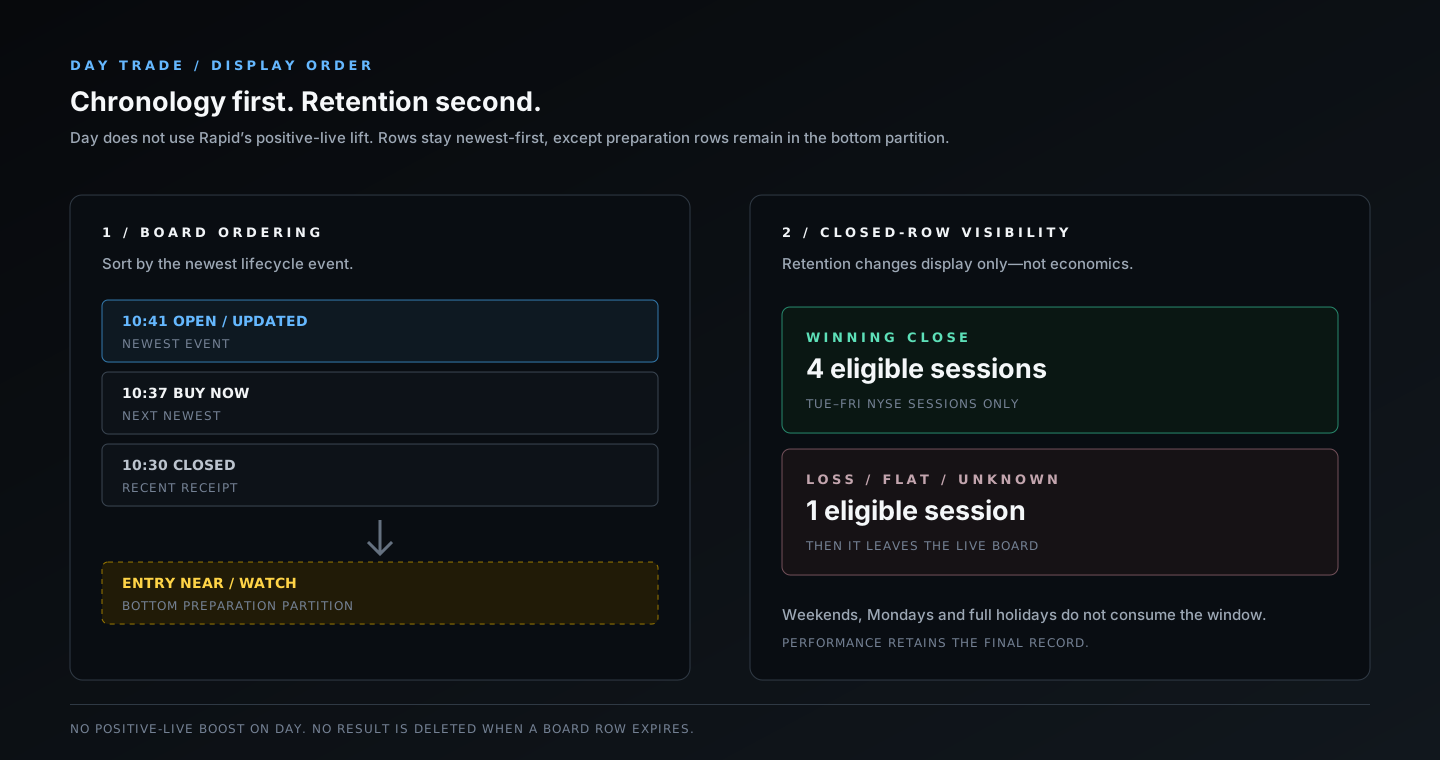
1OPEN, entry instructions, updates and recent closes sort by their newest lifecycle event.
2ENTRY NEAR and WATCH remain at the bottom because they are preparation, not active positions.
3Winning Day closes can remain visible for four eligible Tuesday-through-Friday NYSE sessions.
4Loss, flat and unknown outcomes remain for one eligible session. Weekends, Mondays and full holidays do not consume either window.
Retention is display-only. When a closed row leaves the live board, its Performance record, timestamps and realized result remain intact.
Day Trade / Chapter 08
Keep Day ownership attached everywhere.
A native Day trade can also be distributed into Rapid for wider visibility. That does not create a second entry, exit, duration or P&L record.
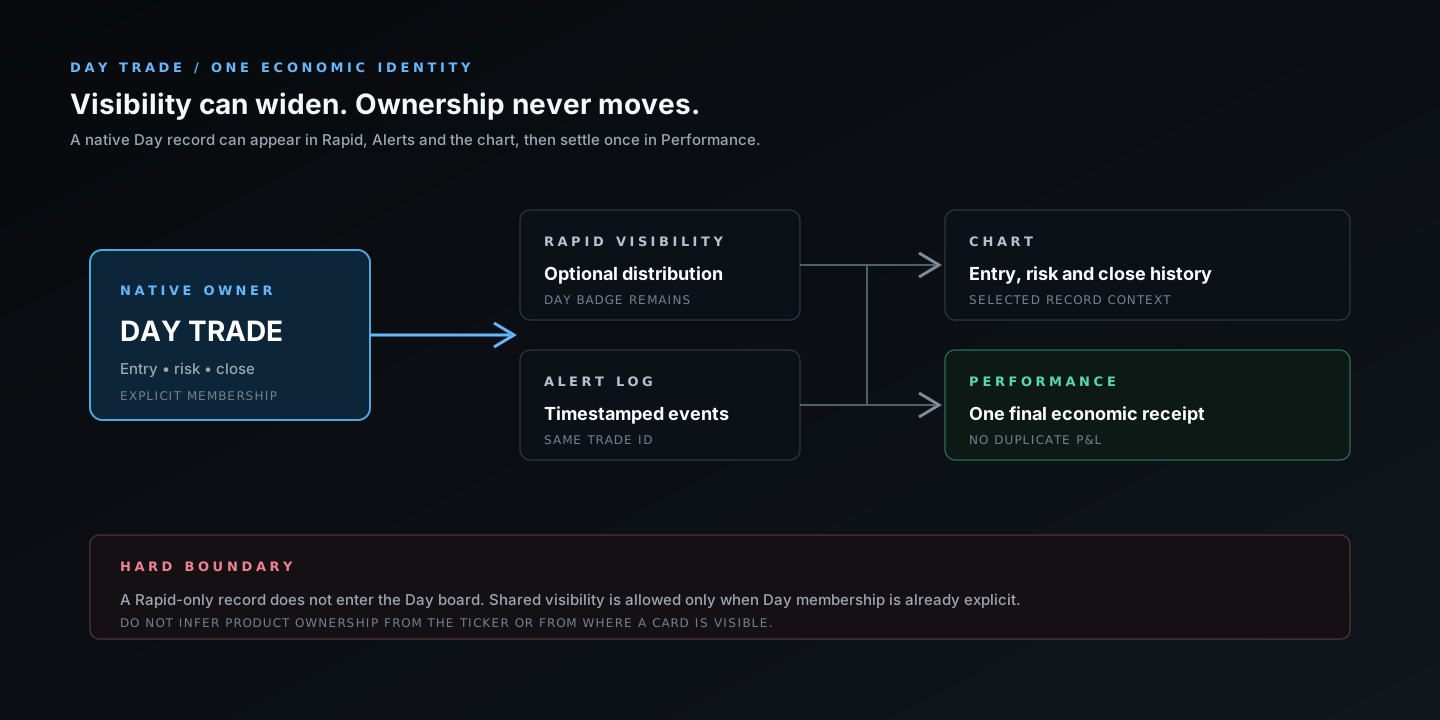
1DAY is the native owner when membership is explicitly attached to the trade record.
2An eligible Day card can also appear on Rapid, but the DAY badge and same-session rules remain attached.
3Alert Log, chart and Performance resolve the same durable trade identity; only one final economic receipt exists.
4A Rapid-only trade never enters the Day board merely because the ticker is familiar or the horizon looks short.
Day Trade / Chapter 09
Use the chart as a timestamped trade record.
The expanded chart joins the selected card to its exact entry, active SL, live or final mark and any published level-change time.
This real HCA Day position shows why the headline comes before the candles. Entry, P&L, current stop and timestamps stay visible above the plot, so zooming or changing range cannot detach the chart from the trade record.
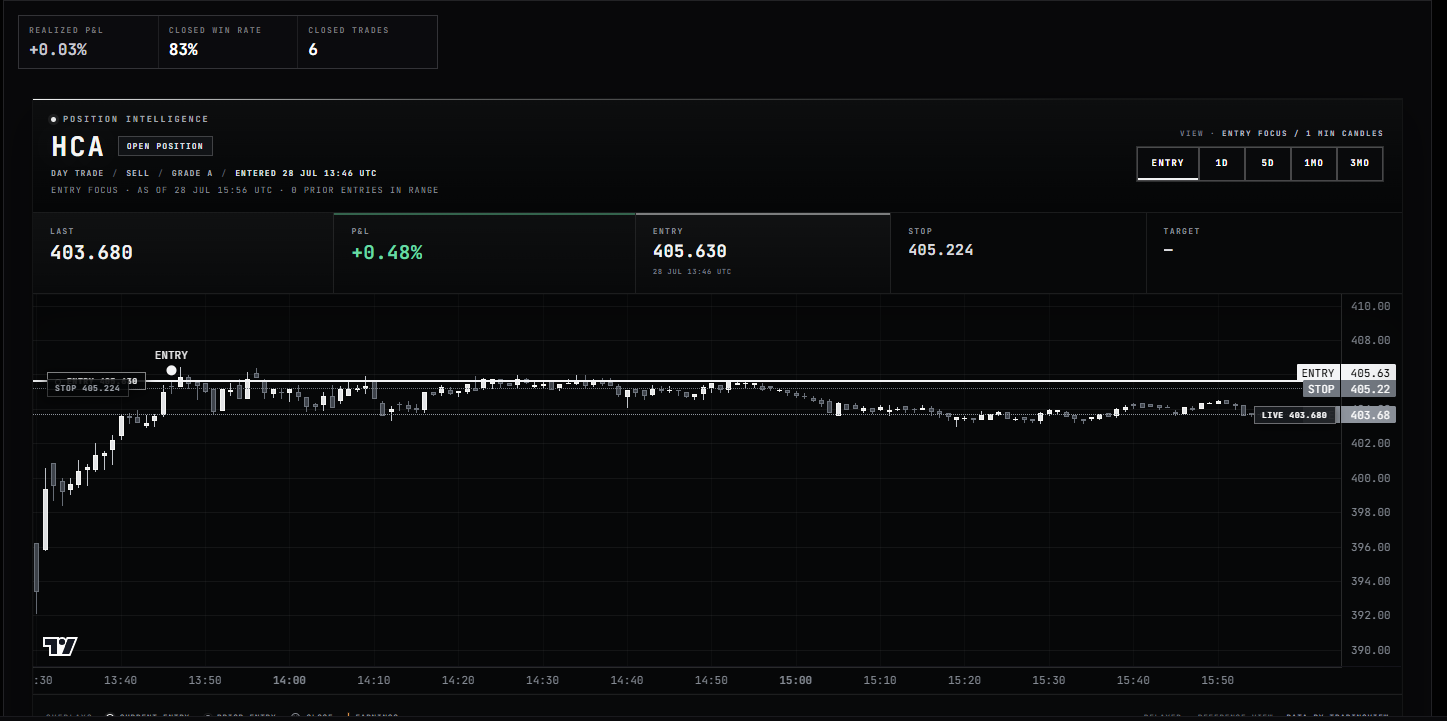
1DAY TRADE, side, grade and entered time establish the exact record before you read candle shape.
2Entry remains fixed and includes its timestamp. P&L and the live mark are shown separately.
3STOP is the current active managed-risk level. When it changed, the update time appears beneath it.
4ENTRY focuses the event; 1D, 5D, 1M and 3M change visual range without changing the selected trade.
5The plotted ENTRY marker locates the published reference on its candle. It is not selected after viewing later price action.
Best use of the chart: answer one question at a time—when entry published, when risk changed, how price behaved around that time, or where the close recorded.
Day Trade / Chapter 10
Read Alert Log as a sequence of events.
The board tells you the newest state. Alert Log tells you what changed, when it changed and which product identity the event belongs to.
In this real Alert Log crop, LOW and ULTA carry Rapid Trade · Day Trade ownership labels with SELL NOW instructions. The shared visibility does not duplicate the trade; it makes the same entry event visible on both eligible surfaces.
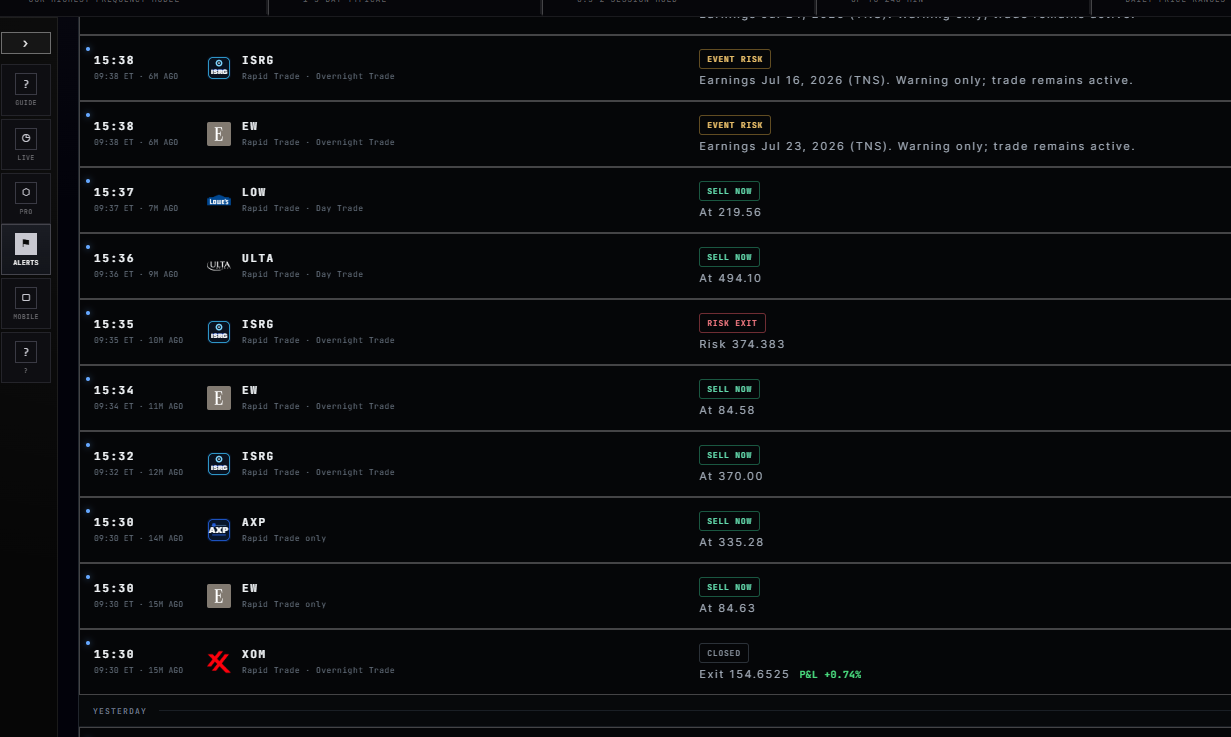
1Local time is paired with ET and an age so phone and Terminal events can be reconciled precisely.
2LOW and ULTA are labelled Rapid Trade and Day Trade. That is shared visibility for one identity, not two entries.
3SELL NOW says exactly what happened and prints the published entry reference beneath it.
4A risk-exit event communicates the close cause and level instead of repeating the original entry message.
5CLOSED supplies the final event and realized result; Performance remains the authoritative expanded receipt.
A normal Day event sequence
BUY NOW or SELL NOW
Direction, entry reference and timestamp publish.
OPEN
The position receipt confirms an active recorded trade.
PROTECTED / LEVEL UPDATE / NEAR STOP
The current risk context changes; the new event should say what changed.
EVENT RISK
A scheduled catalyst is attached as warning-only context and can remain on the closed record.
CLOSED
The live lifecycle ends, whether risk or the same-session time boundary ended it first.
Day Trade / Chapter 11
Verify the final trade in Performance.
Performance is the durable receipt: product tags, exact entry and exit, duration, realized result, close reason and the supporting chart.
This expanded real record shows FICO with DAY and RAPID tags. The tags prove shared product visibility; the single row, one entry, one exit and one result prove that the economics were not duplicated.
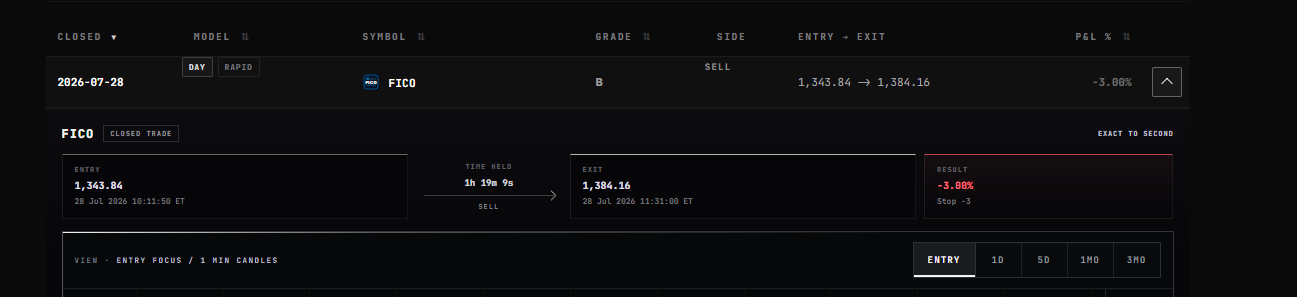
1DAY preserves native ownership; RAPID records eligible distribution. DAY and RAPID tags resolve to this one row.
2The entry block preserves the published price and exact timestamp.
3Time held is calculated from the recorded entry and exit; the exit block preserves the final published price and time.
4Realized P&L and close reason are final here. Expand the chart below for the visual history.
What Performance settles
Published start
Price, side, grade and timestamp are attached to the same durable trade identity.
Exact duration
The hold is calculated from the recorded timestamps, not estimated from the chart width.
Published finish
Exit price, time and reason are grouped together and remain after the live row expires.
One realized result
Shared Day/Rapid visibility never creates a second economic outcome.
Day Trade / Chapter 12
Carry the same reading order into the mobile app.
Mobile compresses the table into cards, but product selection, primary state, side, grade, entry, SL, live or closed price, P&L and chart remain intact.
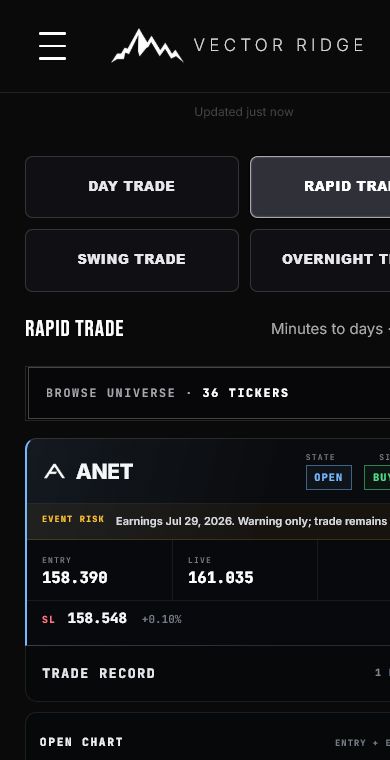
1Tap Day Trade in the product selector to isolate native Day cards.
2The compact card preserves state, side, entry, live price, SL and P&L in the same hierarchy as desktop.
3Open Chart expands the selected trade without changing its product or identity.
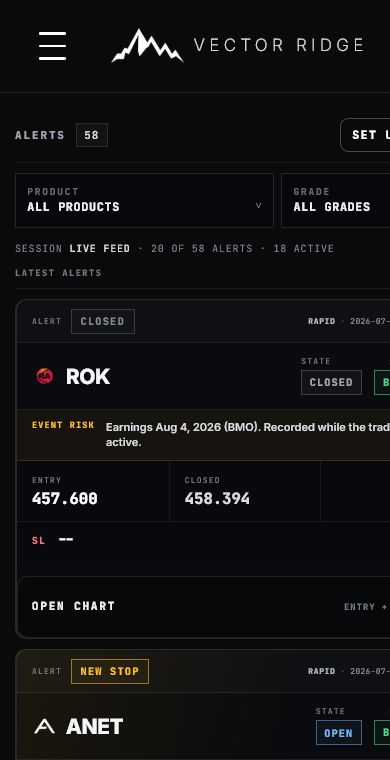
1Use Product to choose Day Trade and Grade to narrow the feed without changing the underlying event order.
2CLOSED at the top tells you the live lifecycle ended before you inspect the final price and P&L.
3A NEW STOP or level-update alert should describe the new event rather than repeat the entry instruction.
Phone workflow
Select Day Trade
Confirm the active product before reading any card.
Read the top event or state first
This tells you what changed before you inspect prices or P&L.
Open chart for the exact record
The drawer should remain open while you inspect Entry, 1D, 5D, 1M or 3M.
Open Alerts for chronology
Entering Alerts refreshes the feed so the newest published event appears first.
Day Trade / Chapter 13
Use the right authority for every question.
The live board, Alert Log, chart and Performance are complementary. Reliability comes from asking each surface the question it was built to answer.
Current Day card
Authority for primary state, side, entry, current SL, live mark and open P&L.
Alert Log
Authority for the timestamped sequence of entry, risk changes, warnings and close.
Chart
Authority for the visual history attached to the selected trade and its timestamps.
Performance
Authority for closed entry, exit, duration, reason and realized result.
Common questions
Does ENTRY NEAR mean a Day position is open?
No. It is a preparation state. Wait for BUY NOW or SELL NOW and the recorded OPEN lifecycle.
Does Day always remain open for 240 minutes?
No. That is the maximum regular-hours horizon. An earlier active-risk or session-close event can finish the trade first.
Why did the SL change?
The row shows the current active managed-risk level. Use its warning, chart and Alert Log to see when the published level changed.
Where is the Day target?
Day does not publish a fixed target. A dash in the Target field is intentional.
Why can the same Day trade appear in Rapid?
Eligible Day records can be distributed into Rapid for visibility. DAY ownership remains attached and Performance records the economics once.
Why did a recent close disappear from the live board?
Closed-row retention is display-only. Winning closes can remain for four eligible Tuesday-through-Friday NYSE sessions; loss, flat and unknown outcomes remain for one. Performance keeps the final record.
Why is a positive live Day trade not automatically at the top?
Day uses strict newest-event-first chronology. The positive-live visibility lift belongs to Rapid, not Day.
What if the expanded chart looks narrow or partly blank?
Collapse and reopen it, then choose Entry. The chart resynchronizes after the row reaches full width while preserving valid manual zoom and pan.
Ready
Open Day Trade with state, risk and clock aligned.
Start with the newest public state, confirm the DAY badge, read current risk and use Alert Log, chart and Performance for the evidence behind the row.