
Rapid combines native Rapid cards with eligible Swing, Overnight and Day positions in one fast board.
Trading Terminal / How to use / Rapid Trade
Read the fastest board without losing the trade.
A screen-by-screen guide to newest-first scanning, positive-live visibility, native product ownership, entry and stop updates, alerts, charts and the single final record in Performance.
Newest firstChronology is the baseline
Positive liveBounded visibility lift
One identityNo duplicate economics
One receiptVerified in Performance
The state tells you what changed. The badge tells you which product still owns the trade.
Use Rapid for visibility, the Alert Log for chronology and Performance for the final receipt.
Rapid Trade / Product tour
Move from the busiest board to one exact record.
Rapid is a visibility surface and a native trade product at the same time. The state tells you what happened; the badge preserves who owns the position; Performance resolves the final economics once.
The live Rapid Trade board
The board combines actionable instructions, open positions and recent closes. This loaded product capture shows the real reading hierarchy: product identity on the left, current instruction in the state stack, risk and price fields through the middle, then live or closed performance and the chart control.
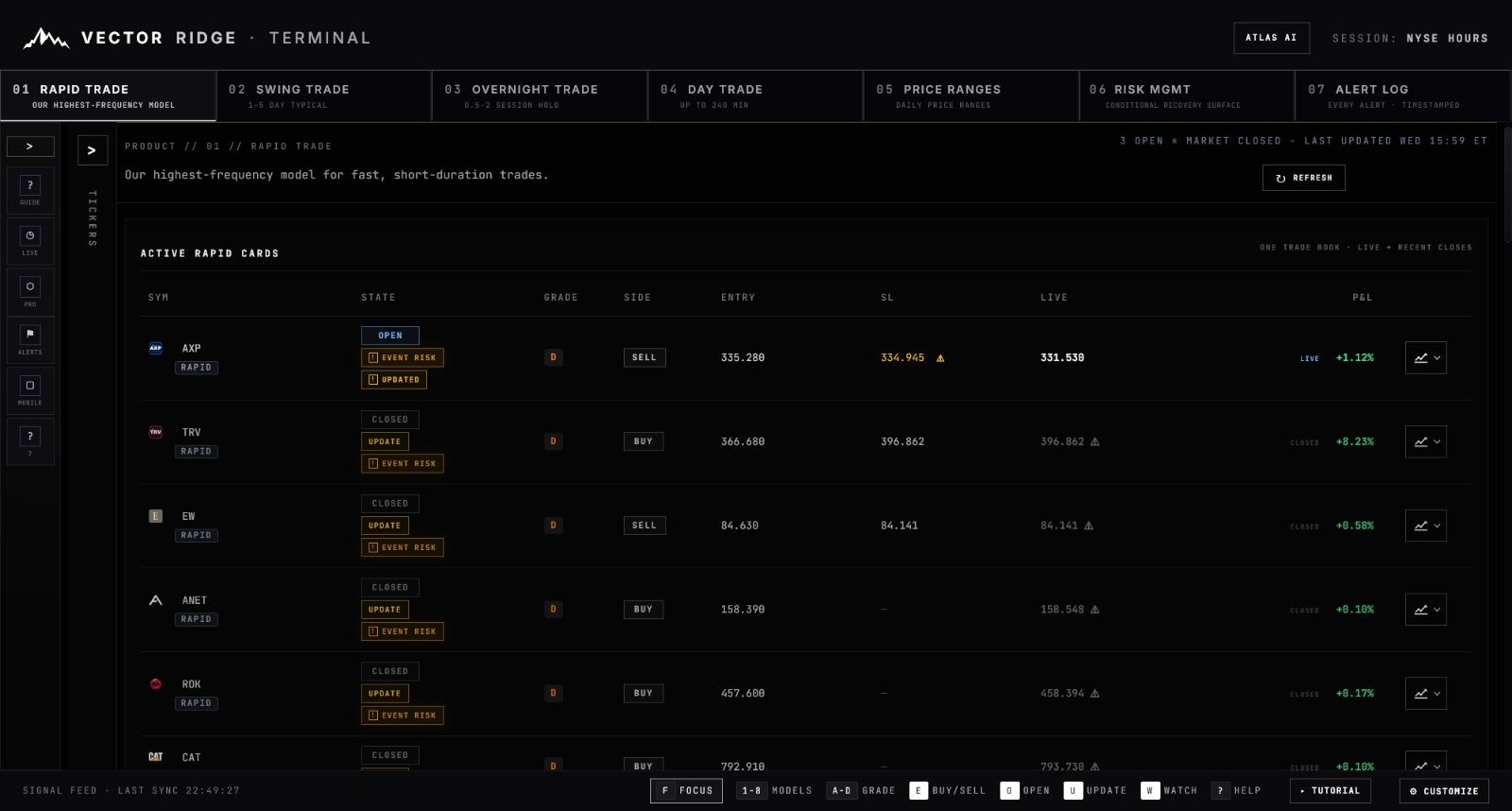
1The selected Rapid tab establishes the high-activity view. It does not change the native owner printed beneath each symbol.
2RAPID beneath AXP confirms a native Rapid position. Lower rows can carry SWING, OVERNIGHT or DAY instead.
3AXP is OPEN. EVENT RISK records a warning, while UPDATED confirms that a managed field changed.
4Read entry, current stop and live reference together. The warning beside the stop indicates that it moved.
5LIVE or CLOSED tells you which P&L you are reading. The chart button opens the selected trade’s timestamped history.
Use screenshots for orientation, not current instructions. Prices, states and timestamps are frozen at capture time. The live Rapid board remains the authority for what is active now.
Rapid Trade / Chapter 01
Know whether Rapid owns the trade or distributes it.
Rapid is the highest-activity model and the consolidated visibility board. Those roles coexist, so always pair the newest state with the native product badge.
Native Rapid
A RAPID badge means Rapid owns the entry, management lifecycle and close.
Distributed visibility
SWING, OVERNIGHT or DAY means Rapid is surfacing the original position without taking ownership.
Fast chronology
The newest event remains the baseline so fresh instructions and changes are easy to find.
One economic record
Distribution never duplicates entry, exit, duration or P&L in Performance.
Rapid visibility is not product ownership. Use the badge beneath the symbol before applying the product's expected horizon or management rules.
Rapid Trade / Chapter 02
Read one complete card before moving to the next.
The fastest reliable order is primary state, product owner, side, entry, current stop, live or closed reference, then P&L.
Start at the left edge and move right. The focused capture below deliberately includes one live open row and one recent closed row, so you can see which fields change when the lifecycle ends.
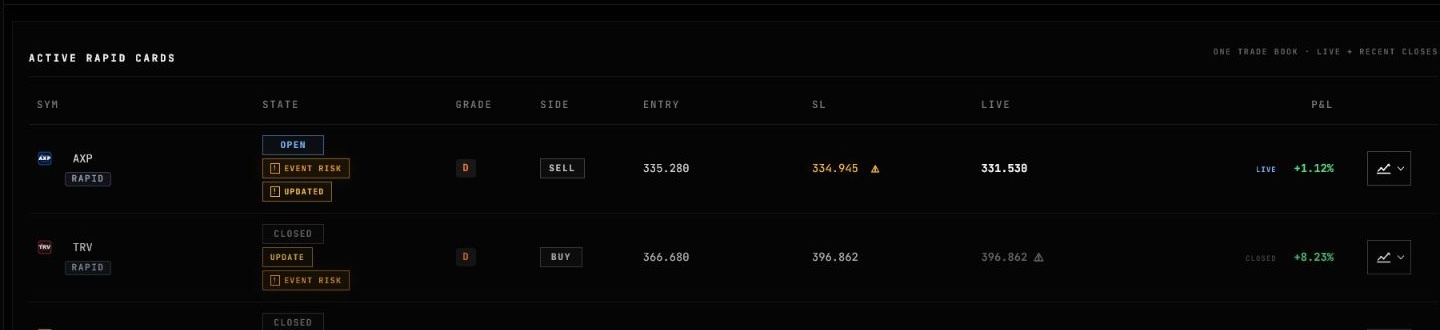
1The ticker identifies the company; the badge underneath identifies the native trade product. Both AXP and TRV are native Rapid here.
2AXP is OPEN with EVENT RISK and UPDATED context. TRV is CLOSED, so its lifecycle has ended even though warnings remain visible.
3Grade D is the conviction recorded at entry. SELL for AXP and BUY for TRV determine how their returns are calculated.
4Entry remains fixed for the life of the economic trade and anchors its displayed return.
5AXP’s yellow stop and warning icon show that the current published level differs from the original level.
6AXP shows a live result from the current mark. TRV shows a closed result attached to the final recorded exit.
The same fields, isolated
Use this clean field map when the full table feels dense. It separates the seven questions a row answers without changing the production terminology.
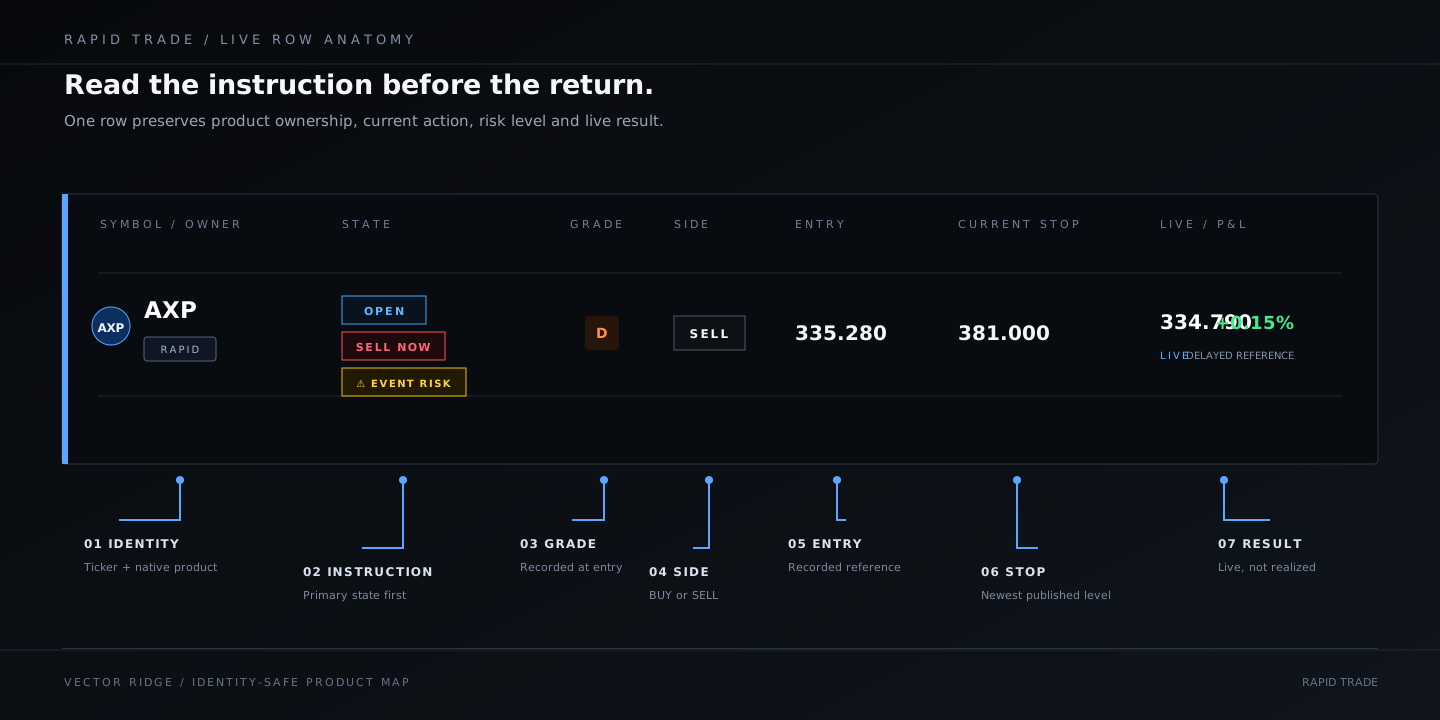
Field reference
| Field | What it answers | What not to assume |
|---|---|---|
| Owner badge | Which product owns the trade lifecycle? | Being visible in Rapid does not automatically make it native Rapid. |
| State | What is the newest instruction or lifecycle status? | A warning badge is not automatically the primary instruction. |
| Grade | What conviction was recorded at entry? | Grade does not replace the stop or close state. |
| Side | Is the position BUY or SELL? | Do not infer direction from green or red P&L. |
| Entry | What price anchors the recorded trade? | ENTRY NEAR is not yet a completed entry. |
| SL | What manager level is currently published? | The displayed value may have changed since entry. |
| Live / Closed | What price is active now, or what close was recorded? | A delayed live reference is not a broker quote. |
| P&L | How is the position performing relative to its recorded side? | Open P&L is not the final realized result. |
Rapid Trade / Chapter 03
Separate the primary state from the context around it.
A Rapid card can carry several badges. Their order matters: the lifecycle instruction is primary; updates and event warnings explain what changed around it.
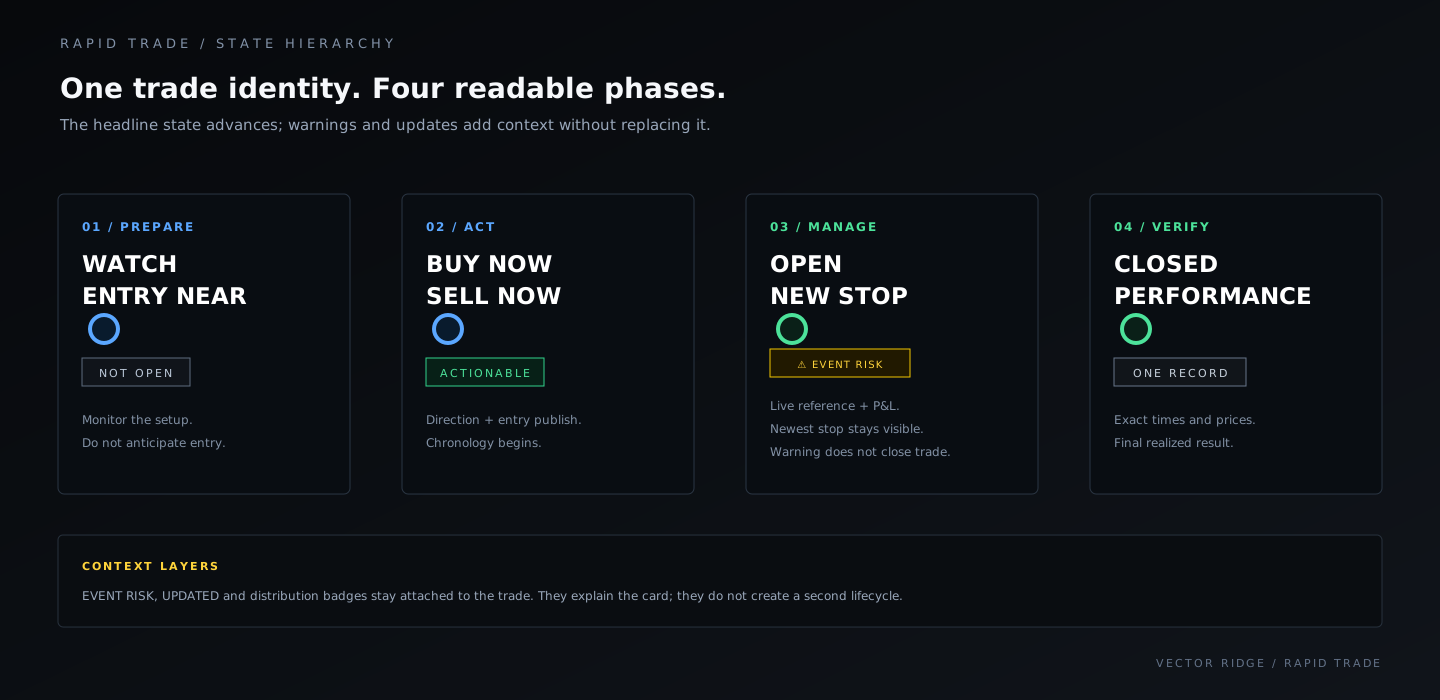
1WATCH and ENTRY NEAR prepare you for a possible signal; no position is open.
2BUY NOW or SELL NOW is the actionable entry instruction.
3OPEN confirms the position. UPDATED or NEW STOP tells you management changed.
4CLOSED ends the live lifecycle. Performance owns the final timestamped result.
| Badge | Meaning | Your next check |
|---|---|---|
| WATCH | Setup is monitored but not actionable. | Wait for an entry instruction. |
| ENTRY NEAR | Price is close to the model entry. | Confirm distance and direction; do not pre-enter. |
| BUY NOW / SELL NOW | The entry instruction is active. | Read the entry price, side and timestamp. |
| OPEN | The position has a recorded entry. | Monitor current stop, live reference and P&L. |
| UPDATED | A managed field changed. | Hover the warning and open the chart for history. |
| EVENT RISK | A scheduled catalyst is attached. | Read the event and date; it is warning-only unless the primary state changes. |
| CLOSED | The trade is no longer live. | Use the expanded Performance record for the final receipt. |
Rapid Trade / Chapter 04
Your 60-second Rapid scan.
The routine is intentionally fast: refresh, find the newest action, confirm the native owner, then inspect levels or chronology only where needed.
Open Rapid Trade and press Refresh
Confirm the session banner, last-updated timestamp and the open/near summary before reading rows.
Scan BUY NOW and SELL NOW first
These are the fresh actionable states. OPEN is active; CLOSED is a recent receipt.
Confirm the owner badge
RAPID is native. SWING, OVERNIGHT and DAY retain their original product rules.
Read side, entry, stop and live reference
This tells you direction and current position state without opening every chart.
Open the chart only when needed
Use it for the exact entry timestamp, level-change history, price behavior or close marker.
Use the right receipt
Alert Log answers when the event changed; Performance owns the final close and realized result.
Rapid Trade / Chapter 05
Keep native ownership attached to every surface.
Rapid can surface eligible Swing, Overnight and Day positions. That wider visibility does not create a second entry, exit, duration or P&L record.
The product badge is the quickest proof. In this live board section, RAPID rows sit above OVERNIGHT and SWING rows without losing their original ownership. RAPID, SWING, OVERNIGHT or DAY is assigned by the product contract, never inferred from the ticker.
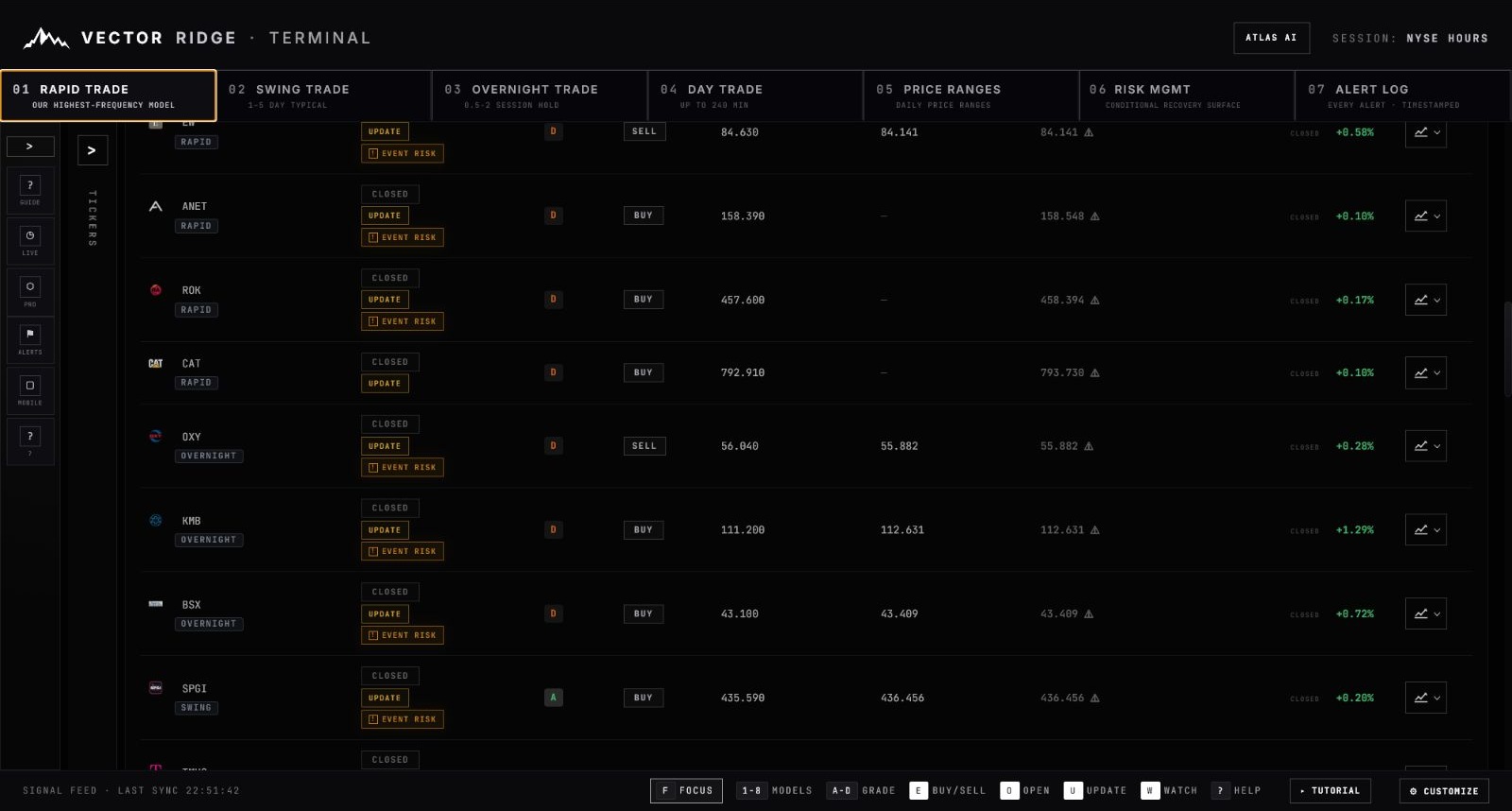
1EW, ANET, ROK and CAT carry RAPID badges, so Rapid owns those trade records.
2OXY, KMB and BSX carry OVERNIGHT badges. Rapid is distributing them, but Overnight still owns their lifecycle.
3SPGI carries a SWING badge for the same reason. Product membership comes from the record, never from ticker inference.
4Every row still shows one closed mark and one final return. Rapid visibility does not add another economic outcome.
How one identity reaches every surface
The diagram makes the deduplication path explicit: one native owner can be visible in Rapid, the Alert Log and the chart, but Performance resolves it once.
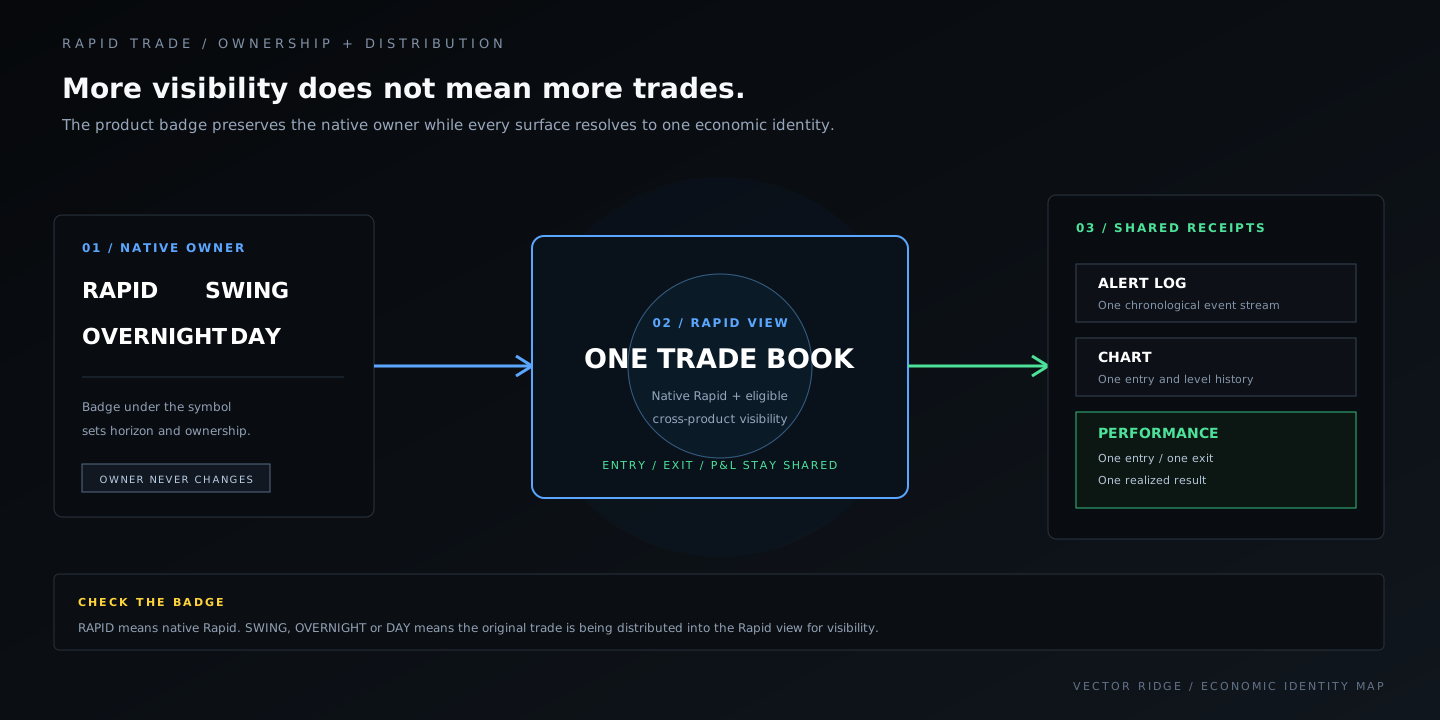
Closed beats live when records overlap. Once the authoritative close exists, the closed outcome wins over a stale live projection of the same economic trade.
Rapid Trade / Chapter 06
Newest event first, with one strict visibility lift.
The newest lifecycle event remains the baseline. A live trade with a strictly positive return proven from its displayed entry and current mark is boosted so users can see positions that are working.
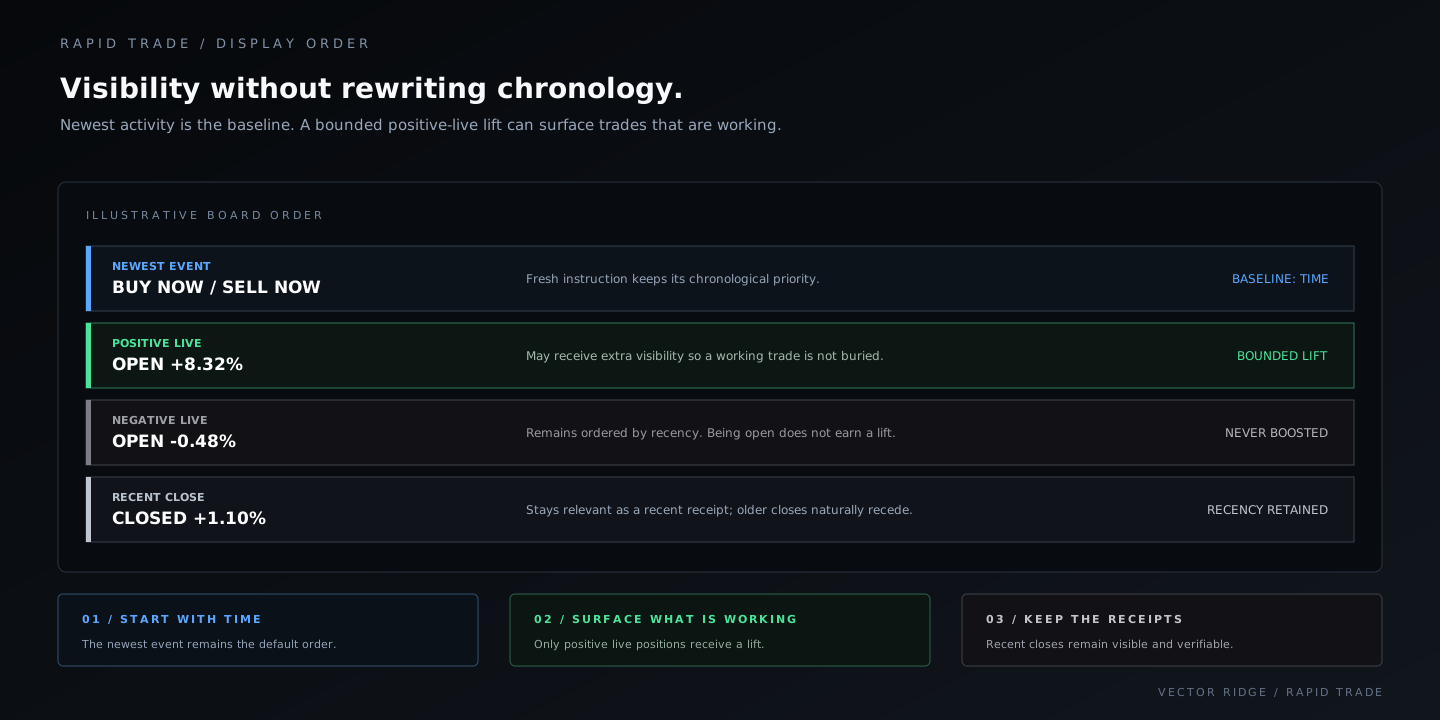
1The newest lifecycle event wins within each group and everywhere no lift applies.
2Only a strictly positive live return proven by displayed entry and current mark qualifies for the lift.
3Flat, negative or unavailable-mark live trades are never boosted simply because they remain open.
4Recent closes remain relevant receipts and then recede naturally with age.
No hidden priority tiers. Urgency, grade and P&L magnitude do not create additional ordering layers; a stale aggregate return is not enough to prove the boost.
Rapid Trade / Chapter 07
Use the chart to answer one specific question.
The chart joins the exact entry timestamp, current stop, prior level history and live or closed reference to the selected Rapid card.
This is the same live AXP position shown in the board. The expanded view proves that the row, headline values and plotted overlays all resolve to the same entry and updated stop.
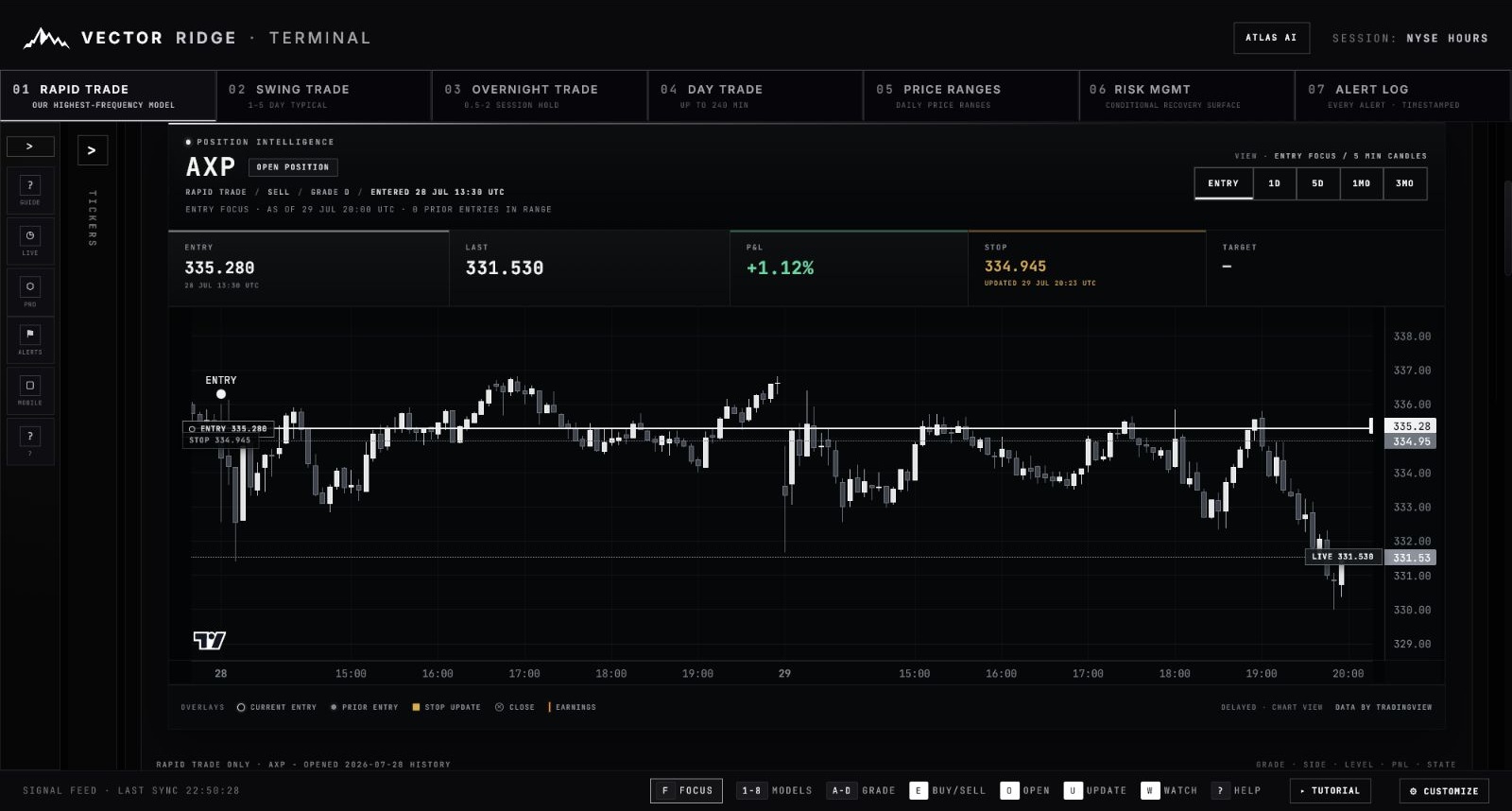
1The ENTRY marker pins the recorded 335.280 reference to its exact candle. It is not inferred from the visible high or low.
2The headline preserves entry, last mark and side-aware P&L above the plot so the chart cannot detach from the trade record.
3ENTRY focuses the event. 1D, 5D, 1M and 3M change range and candle interval without changing the selected trade.
4LIVE 331.530 is the delayed current reference. Because this position is SELL, a lower mark produces the positive live return shown above.
5The stop headline shows both the current 334.945 level and its update timestamp. Earlier levels remain history, not the current instruction.
Event focus
Best for confirming the recorded entry time and the immediate price response.
Intraday detail
Use when you need the most granular view around a same-day update.
Short-horizon context
Useful when a native or distributed Rapid card spans more than one session.
Structure
Use for broader context, not to replace the published entry or stop.
Rapid Trade / Chapter 08
Read alerts as a sequence, not isolated messages.
The Alert Log answers what changed and when. It is the fastest way to reconcile an entry instruction, later stop update, event warning and eventual close.
The live Alert Log below shows the exact distinction users need: AXP received a LEVEL UPDATE, while TRV received a FLOOR EXIT and EW received a CLOSED receipt. Each event says what happened instead of repeating the original entry.
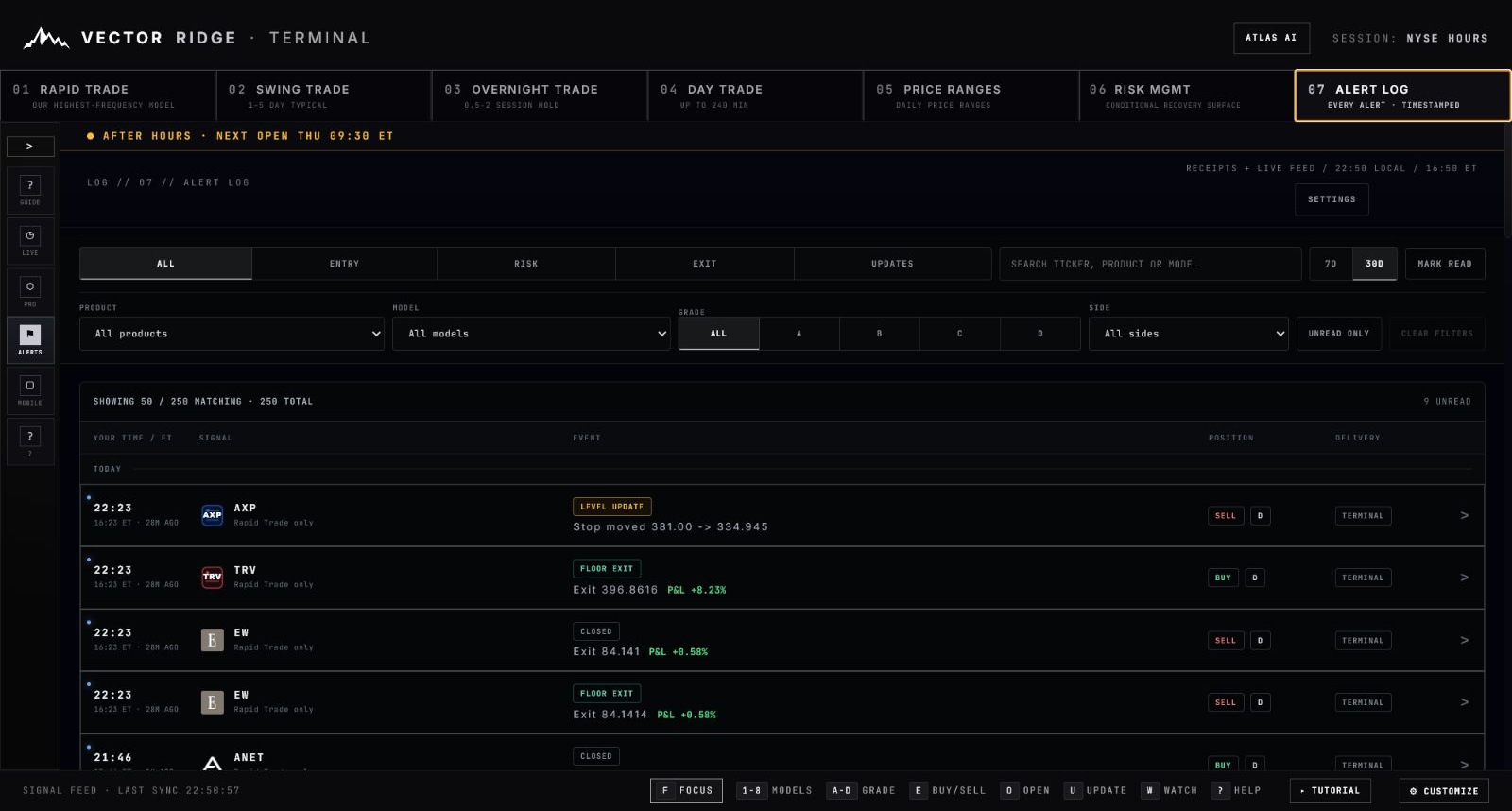
5Filter by event type, product, model, grade, side or unread state without rewriting the underlying chronological feed.
1Your local time is paired with ET and an age, so the event can be reconciled across the phone and Terminal.
2The symbol and “Rapid Trade only” label preserve the native product identity for each event.
3LEVEL UPDATE, FLOOR EXIT and CLOSED state exactly what changed. The detail beneath records the new stop or exit and final P&L.
4Side, grade and delivery stay attached. Use the right-edge action to return to the affected trade instead of searching manually.
The normal Rapid sequence
BUY NOW or SELL NOW
The direction and entry reference are published.
OPEN
The position receipt confirms entry and begins live management.
NEW STOP / UPDATED
The current manager level changes. The phone notification should describe this event, not repeat the original entry instruction.
EVENT RISK
A scheduled catalyst is attached as a warning and remains on the closed record when it existed during the trade.
CLOSED
The alert states the position closed. Performance becomes the final authority.
Rapid Trade / Chapter 09
Verify the close in Performance.
Performance deduplicates every economic trade and gives the final record more space than the live board: exact times, prices, duration, reason, evidence and chart.
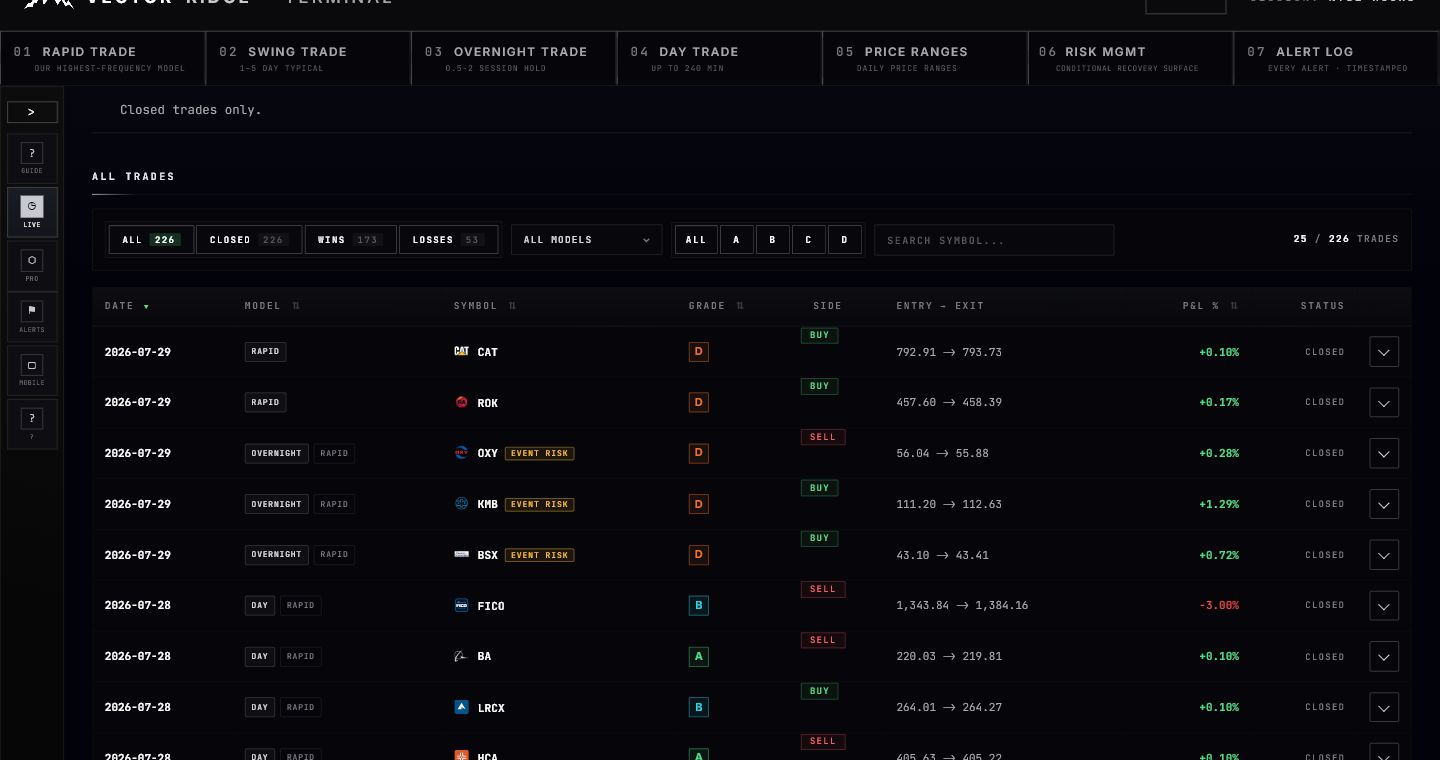
1Use the model filter to isolate native Rapid records.
2Product tags can show the native owner plus Rapid distribution while retaining one economic record.
3The collapsed row summarizes side, entry, exit and final P&L.
4Expand the row for the exact receipt and chart.
The expanded record
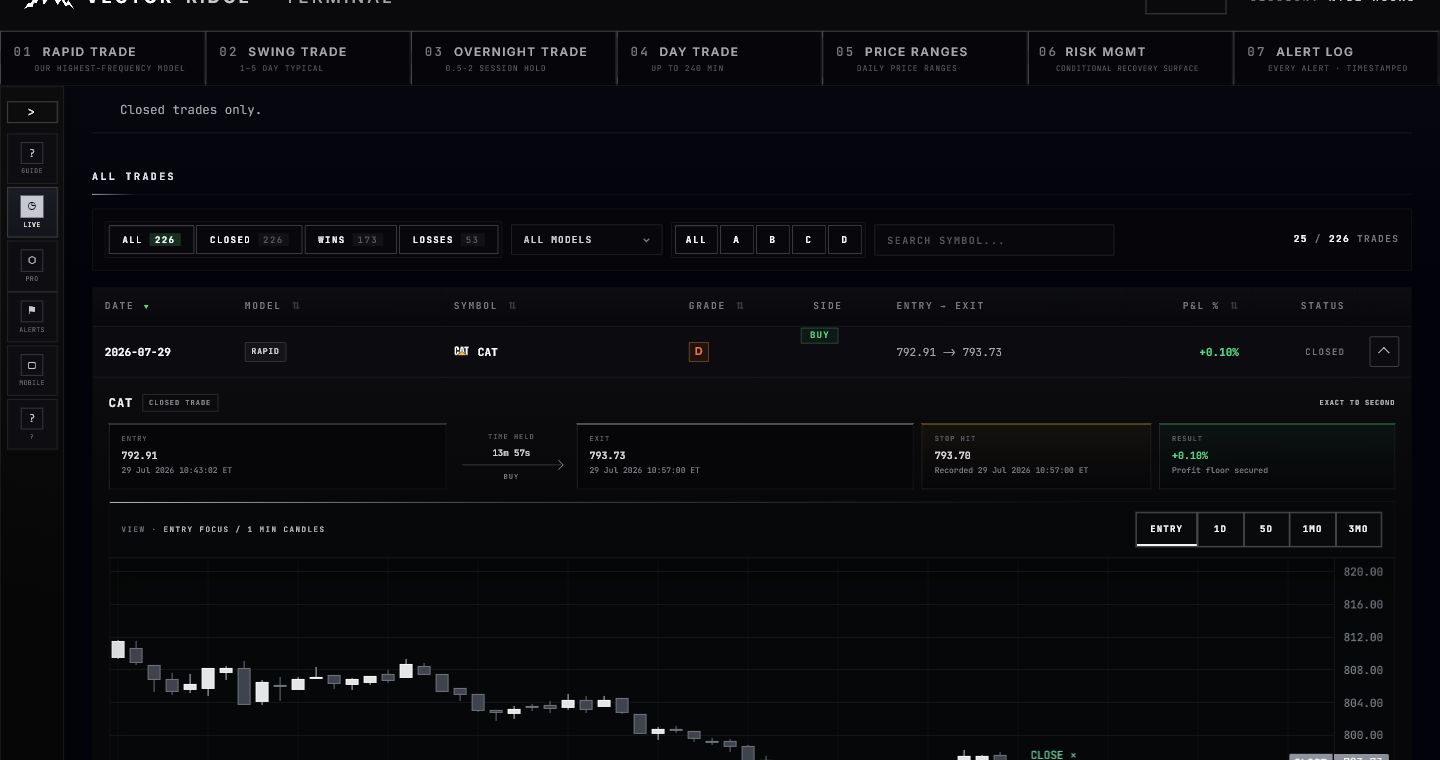
1The entry block preserves the recorded price and timestamp to the second.
2Time held is calculated from the recorded entry and exit timestamps.
3The close block records exit price, realized P&L and close reason.
Rapid Trade / Chapter 10
Use the same hierarchy on mobile.
The mobile app compresses the table into cards, but the product, state, side, grade, entry, stop, live or closed price and P&L remain intact.
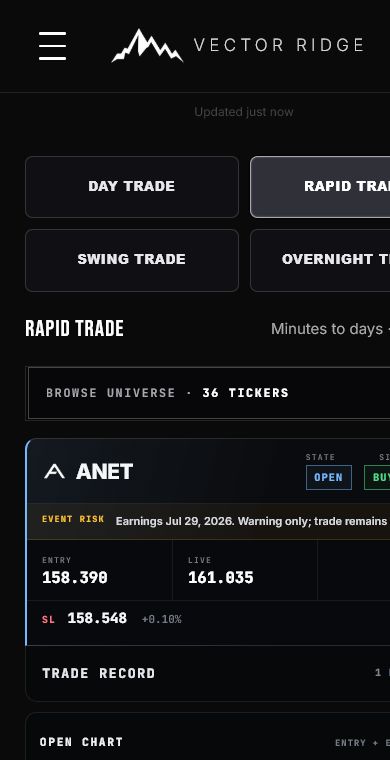
1Tap Rapid Trade in the model selector to isolate native Rapid cards.
2The compact card preserves state, side, entry, live price, stop and P&L.
3Open Chart expands the same Entry, 1D, 5D, 1M and 3M views.
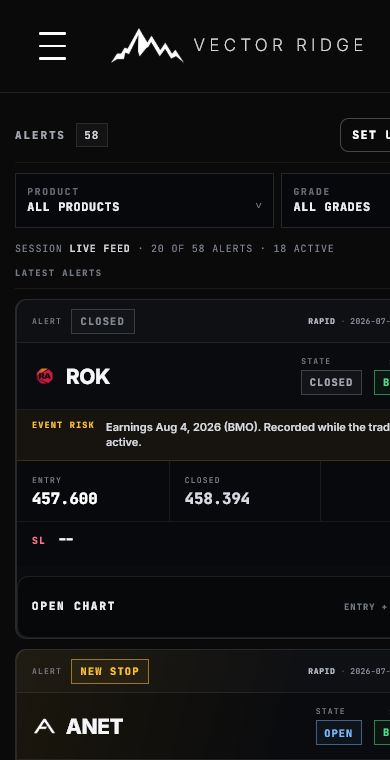
1Use Product and Grade filters to narrow the event stream without changing the underlying record.
2The top label tells you what happened: entry, open, new stop, event risk or closed.
3A stop-update alert should describe the new event rather than repeat the original entry.
Phone workflow
Tap Rapid Trade
Then check the badge: Swing, Overnight and Day cards remain owned by their original product.
Read the alert label and primary state
These explain what happened before you inspect the prices.
Open the chart only when needed
The drawer should remain open while you inspect or switch chart views.
Return to Alerts for chronology
Opening Alerts refreshes the feed so the newest Rapid event appears first.
Rapid Trade / Chapter 11
Know which surface is authoritative.
The live board, Alert Log and Performance answer different questions. Reliability comes from using the right one instead of expecting a single screenshot to do everything.
Current Rapid card
Authority for the newest state, native owner, side, entry, current stop, live reference and open P&L.
Alert Log
Authority for the timestamped sequence of entry, updates, warnings and close.
Performance
Authority for the closed entry, exit, duration, reason and realized result.
Chart
Authority for the visual event history attached to the selected trade record.
Common questions
Does ENTRY NEAR mean a Rapid position is open?
No. It means price is close to the model entry. Wait for BUY NOW or SELL NOW and the subsequent OPEN receipt.
Why does the stop differ from an older screenshot?
The row shows the current published manager level. Hover the warning icon or open the chart to see when the level changed.
Why can a Swing, Overnight or Day trade appear in Rapid?
Rapid distributes eligible native trades for visibility. The badge preserves ownership and Performance deduplicates the economic record.
Does EVENT RISK close the position?
No. It is a warning layer unless the primary state separately changes to a close instruction.
Which P&L should I use after the trade closes?
Use the realized result in the expanded Performance record.
Why is an older positive live trade above a newer row?
Rapid gives strictly positive live positions a bounded visibility lift. Within that group, and everywhere else, the newest lifecycle event wins. Flat or negative live trades are never boosted.
What if the chart opens narrow or partly blank?
Collapse and reopen it, then choose Entry focus. The chart resynchronizes after the row reaches its full width while preserving valid manual zoom and pan.
Ready
Open Rapid Trade with chronology and ownership intact.
Start with the newest state, confirm the native product, use the chart or Alert Log for evidence and Performance for the one final receipt.