Skip to platform guide
Independent trading and investment research. No brokerage or trade execution. Trading involves substantial risk of loss. Read the risk disclosure.

The Vector Ridge platform

ONE RESEARCH SYSTEM. FOUR SPECIALIST WORKSPACES.

Vector Ridge separates the live trade, the investment thesis, the underlying data and the AI research conversation. The Trading Terminal tracks signals. Investor Desk investigates companies and portfolios. Data Vault defines the historical evidence. Atlas AI helps turn that evidence into explicit research workflows.

Each workspace has a separate job and a separate source of truth. Atlas AI does not change live signals, execute trades or invent performance results.

VECTOR RIDGESignals · research
data · evidence
Live stateTrading TerminalSignals, charts, risk, alerts and the exact trade record.
Investment contextInvestor DeskCompanies, ownership, portfolios, events and macro research.
Research partnerAtlas AIQuestions, strategy specifications, deterministic tools and receipts.
Historical evidenceData VaultCatalogued bars, options history and bounded research inputs.

Four jobs, clearly separated

WHAT EACH WORKSPACE IS FOR.

The platform is easiest to understand by asking one question: what decision are you trying to make? Use the workspace that owns that decision, then follow its current timestamped evidence.

Short answer: use the Trading Terminal to follow active trading signals; Investor Desk to research stocks and portfolios; Data Vault to select historical market data; and Atlas AI to ask questions, formalise supported strategy ideas and interpret deterministic results.
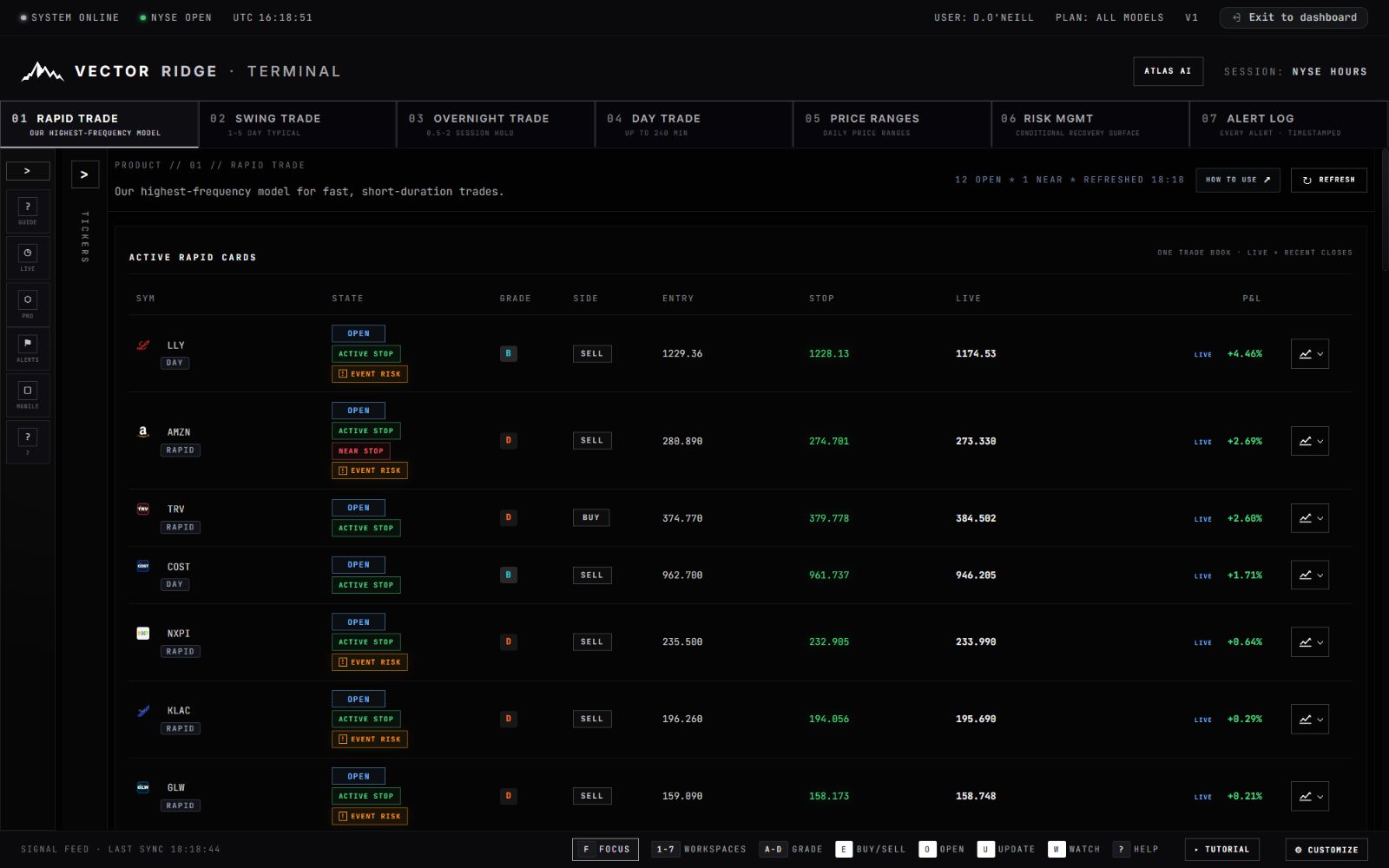
01Vector Ridge Trading Terminal showing a Rapid Trade signal workspace with live states and charts

Signals · lifecycle · risk

TRADING TERMINAL

The operational home for Rapid, Swing, Overnight and Day Trade. Every card carries its own direction, entry basis, grade, lifecycle state, active risk or protection, expiry and timestamps. The newest valid card state is the authority.

  • FollowOpen, pending, protected, updated and closed states.
  • InspectCharts, Price Ranges, event context and Risk Management.
  • ReceiveTimestamped entry, management and exit alerts.
  • VerifyClosed trades against the public realised-performance record.
Explore the Trading Terminal →
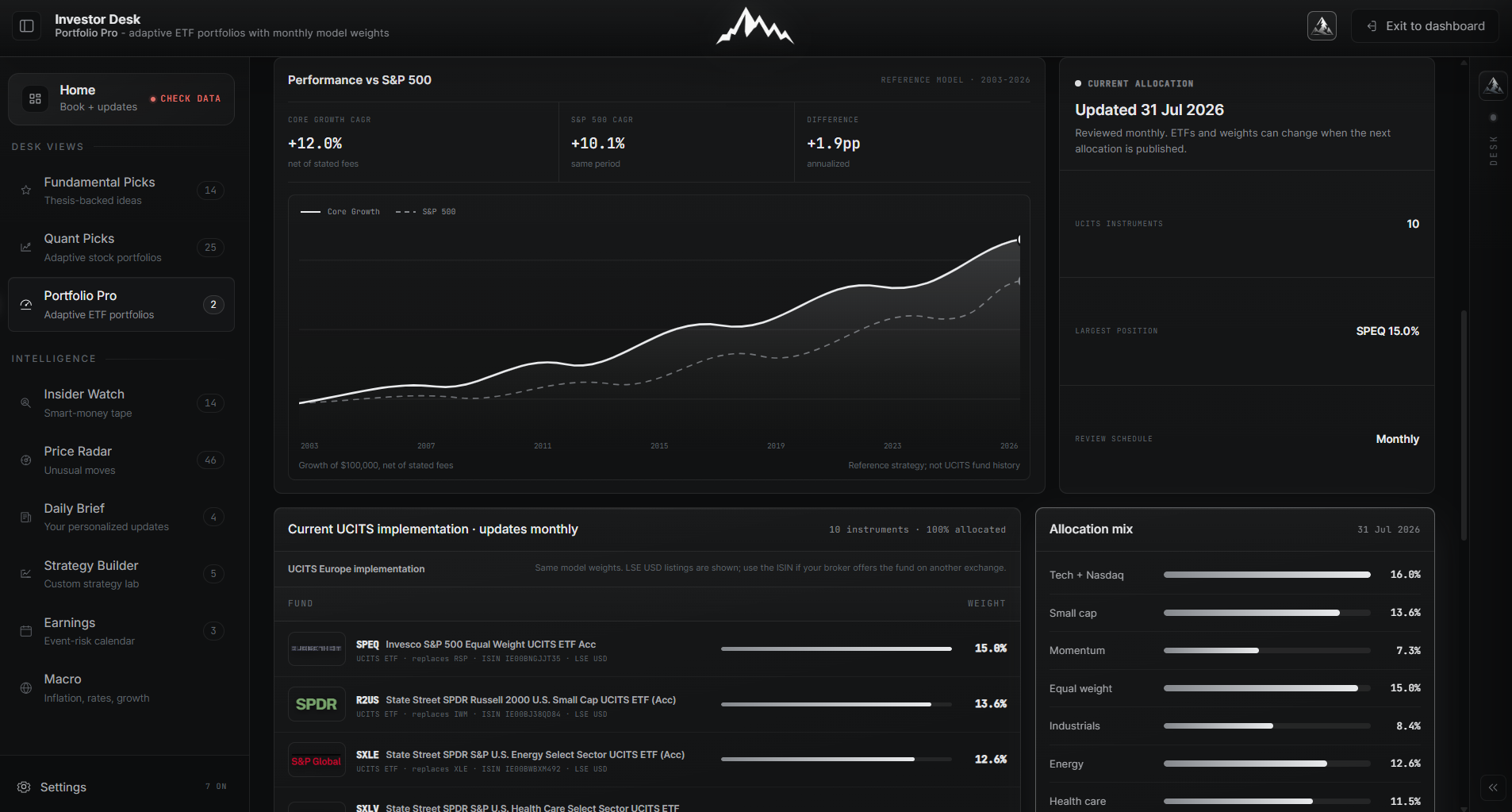
02Vector Ridge Investor Desk Portfolio Pro with model portfolios, ETF weights and benchmark context

Companies · portfolios · ownership

INVESTOR DESK

The long-horizon research workspace. Fundamental Picks explains why a company may be attractive; Quant Picks ranks stocks systematically; Portfolio Pro tracks adaptive allocations; Insider Watch and Price Radar add ownership and valuation context.

  • DiscoverFundamental and model-ranked equity ideas.
  • UnderstandCatalysts, risks, valuation and company context.
  • AllocatePortfolio paths, weights, stress history and alternatives.
  • MonitorOwnership, unusual moves, earnings and macro events.
Read the Investor Desk guide →
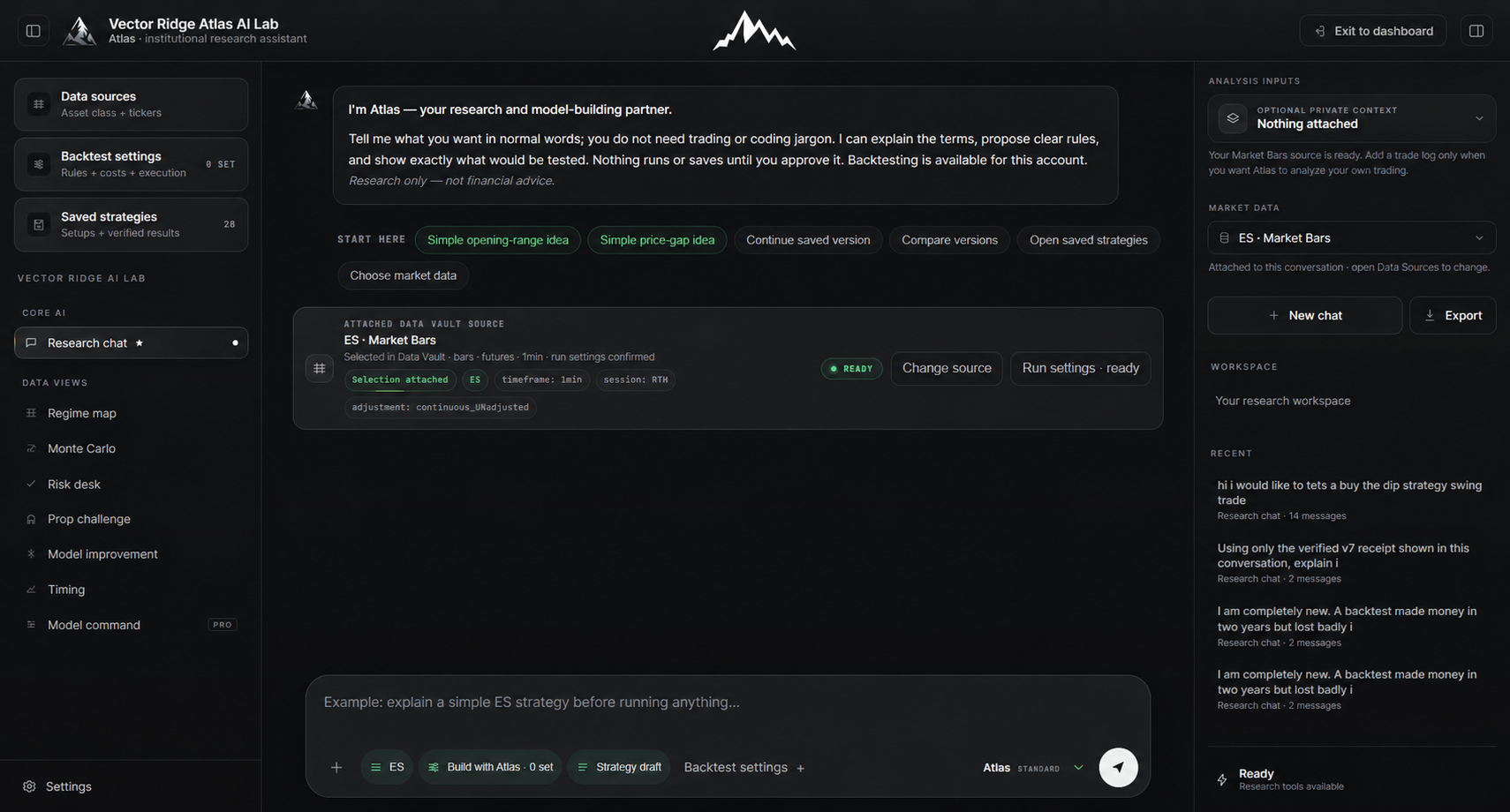
03Vector Ridge Atlas AI research workspace with a structured strategy conversation and evidence panel

Ask · specify · test · challenge

ATLAS AI

Atlas is the explanation and orchestration layer around Vector Ridge research tools. It can turn a defined idea into an inspectable specification, route supported work to deterministic compute and explain the resulting receipt. It does not manufacture backtests or alter live products.

  • QuestionAsk direct market, method and product questions.
  • FormaliseResolve ambiguous rules before any test begins.
  • ComputeUse supported deterministic tools and bounded inputs.
  • ChallengeReview costs, drawdown, holdout behaviour and fragility.
See exactly how Atlas AI works →
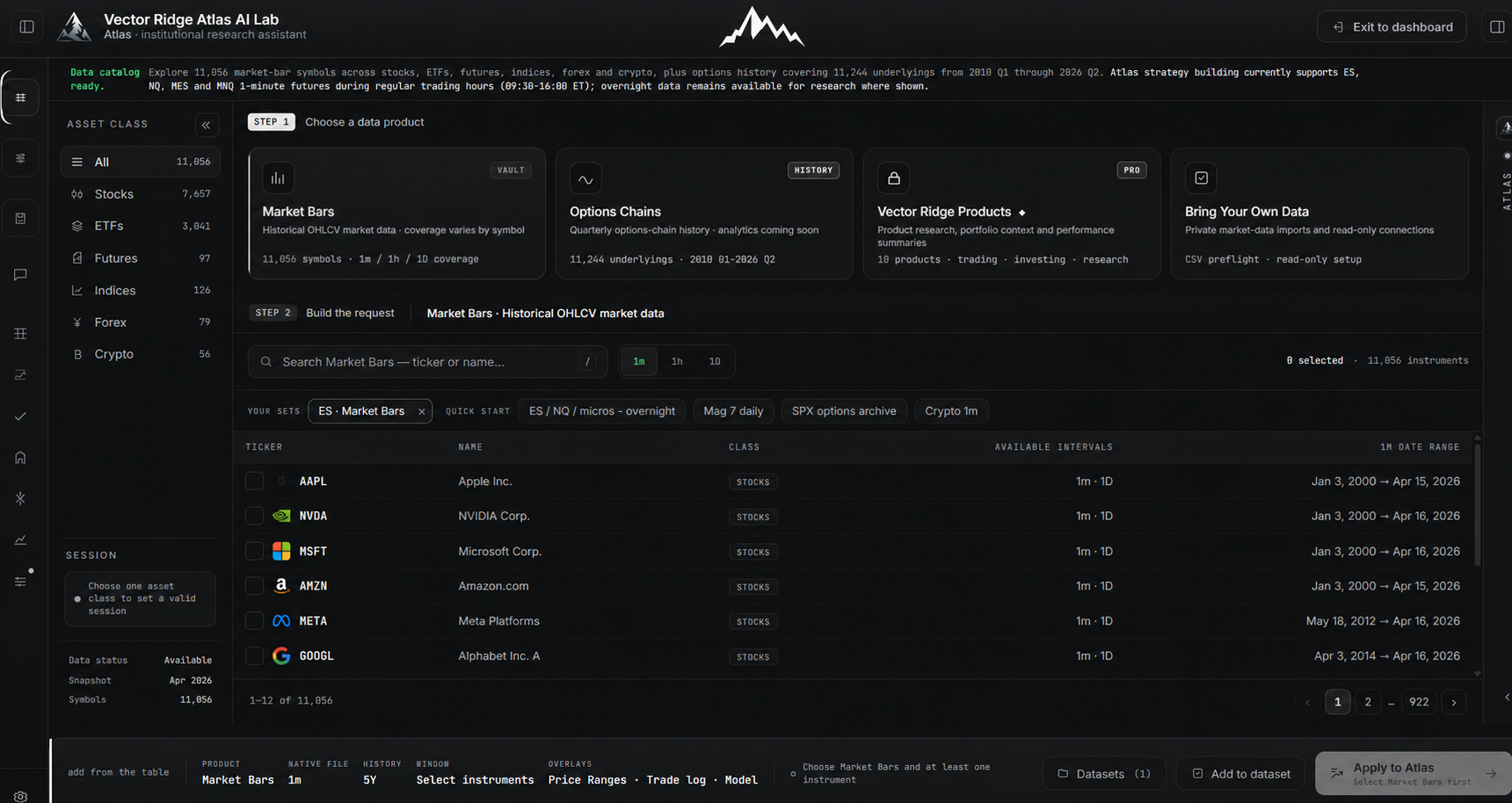
04Vector Ridge Data Vault catalog with market bars, options history, asset filters and Atlas AI handoff

Catalog · coverage · handoff

DATA VAULT

The research-data catalog behind supported historical workflows. Search by asset class, symbol, interval and date coverage, then pass a bounded dataset reference into Atlas AI. Catalog presence does not automatically mean every tool can execute every dataset.

  • SearchStocks, ETFs, futures, indices, forex, crypto and options.
  • BoundSymbol, native interval, dates, timezone and session.
  • ConfirmCoverage and runtime support before computing.
  • HandoffSend metadata and prerequisites—not raw protected bars—to Atlas.
Read the Data Vault guide →

A connected research loop

FROM QUESTION TO EVIDENCE.

The tools connect through explicit handoffs. They do not silently rewrite one another. A signal remains a signal, a dataset remains a bounded input and an AI explanation remains subordinate to the receipt it cites.

01 · Observe

Start with the current state

Open the Trading Terminal or Investor Desk and identify the exact card, company, portfolio or event you are investigating.

02 · Bound

Define the evidence

Choose the relevant Data Vault source, symbol, interval, dates, timezone and session instead of asking for an unbounded market history.

03 · Research

Ask Atlas explicitly

State the question, assumptions, entry and exit rules, costs, risk limits and validation target. Atlas asks when a definition is missing.

04 · Verify

Read the receipt

Trust calculated metrics only after deterministic compute completes. Preserve the source, specification, result and timestamped lineage.

Trading workflow

Signal → alert → chart → record

Follow the newest card state, inspect the manager level and event risk, then verify the final closed record.

Investment workflow

Idea → thesis → ownership → portfolio

Start with a pick, examine catalysts and risks, check who is buying, then decide how it fits the broader allocation.

Strategy workflow

Dataset → specification → test → validation

Bound the history, formalise the rules, run a supported deterministic executor and challenge the result out of sample.

Choose the right surface

THE WORKSPACE COMPARISON.

No single screen should pretend to do every job. This table separates purpose, inputs, outputs and hard limits so users—and search systems—do not conflate a live signal with an AI answer or a historical test.

Vector Ridge product responsibilities and boundaries
WorkspaceBest used forPrimary inputProducesDoes not do
Trading TerminalFollowing active trading signals and their lifecycle.Timestamped product cards and live market context.Current state, chart context, alerts and closed record.Broker execution, personalised sizing or guaranteed fills.
Investor DeskCompany, portfolio, ownership, earnings and macro research.Company fundamentals, rankings, portfolios and event context.Research views, picks, allocations, radars and briefs.A same-session trade instruction or managed portfolio.
Atlas AIQuestions, specifications, supported tests and evidence review.Explicit prompts, approved tools and bounded sources.Research plans, typed specifications and receipt-grounded explanations.Invented metrics, live-signal changes or arbitrary code execution.
Data VaultFinding and defining historical research inputs.Catalog filters, coverage metadata and dataset requirements.A bounded data contract and Atlas-ready handoff.Proof that every symbol or interval is executable by every tool.

Know what to trust

FOUR SOURCES OF TRUTH.

Marketing copy should never outrank the live record. When information differs across an old screenshot, cached article or active product, use the authority designed for that fact.

Live signal

The newest valid card

Use the current timestamped state, entry basis, manager level, expiry and close record—not an older alert screenshot.

Read the Terminal manual
Realised results

The performance ledger

Current public realised performance belongs on the dedicated performance page, where shared economic trades are reconciled.

View performance
Access & price

The Products page

Plans, entitlement, trial eligibility and current prices can change. The Products page is the commercial authority.

View current products
Research result

The completed receipt

Atlas can explain a computed result only after the deterministic tool returns its source-bound completion receipt.

Read the Atlas guide

Plain-English answers

COMMON PLATFORM QUESTIONS.

These answers define the public product boundary. Exact model thresholds, feature weights, calibration constants and internal source routes remain proprietary.

01

Is Atlas AI the trading signal model?

No. Atlas AI is a research and explanation layer. Live Rapid, Swing, Overnight and Day Trade cards remain separately published product records, and Atlas cannot change their state.

02

Does Vector Ridge place trades?

No. Vector Ridge is an independent research service, not a broker, managed account or copy-trading executor. Users remain responsible for orders, sizing and portfolio risk.

03

What is Investor Desk for?

Investor Desk is for longer-horizon company and portfolio research: Fundamental Picks, Quant Picks, Portfolio Pro, Insider Watch, Price Radar, earnings, macro and daily research updates.

04

What is the difference between Data Vault and Atlas AI?

Data Vault identifies and bounds historical evidence. Atlas AI helps frame the research question and uses supported deterministic tools. The catalog is an input authority; the completed run receipt is the result authority.

05

Can Atlas AI backtest any strategy?

No. Public Atlas documentation identifies the supported research templates and data constraints. Unsupported ideas can be drafted and clarified, but they are not represented as executed results.

06

Where should I check current plans and access?

Use the Products page. Evergreen guides intentionally avoid freezing prices or entitlement details that may later change.

Start with the right question

FOLLOW THE SIGNAL. INVESTIGATE THE THESIS. TEST THE EVIDENCE.

Explore the public product guides, then choose the access level that matches the work you actually want to do.