Vector Ridge
Investing involves substantial risk of loss. Past performance does not guarantee future results. Full disclaimer

Ownership intelligence

Insider Watch

See when informed owners materially change exposure.

Insider Watch combines corporate filings, congressional disclosures, institutional ownership, and Vector Ridge research overlap without flooding the screen with routine filings.

Use it when
You need to know whether informed owners materially changed exposure.
Start with
Overview or a specific stock
Leave with
The filing, ownership context, delay, and research overlap

Inside Insider Watch

Move from disclosure to ownership context.

Start with material activity, then trace the company, person, politician, or fund behind it before deciding whether the filing matters.

Select a numbered point to trace the screen.
Insider Watch shown in the Investor Desk interface
Current Insider Watch interface. Select a point above or open the full screen. Displayed names and values can change as the product updates.
Current product screen Insider Watch
Insider Watch full product interface

Why Insider Watch

See when informed owners change exposure.

Insider Watch connects filings to the stock, person, fund, and Vector Ridge research so a disclosure becomes useful context rather than raw paperwork.

01 · Selective radar

Material activity rises above filing noise

Purchases, sales, clusters, ownership changes, filing delays, and research overlap are ranked so routine records do not dominate the screen.

02 · Ownership map

Corporate, political, and institutional evidence together

A stock view combines Form 4 insiders, congressional disclosures, and 13F ownership on one timeline.

03 · Traceable records

Open the person, fund, or source filing

Searchable executive, politician, and fund profiles preserve reported stakes, dates, transaction ranges, and available public records.

Complete product manual

Insider Watch / Product architecture

One ownership system. Five focused views.

Overview is the calm front door to a much larger ownership database. Stocks joins every owner around one company; Executives and Politicians preserve actor-level public records; Funds adds delayed institutional context. The product stays selective on screen while the searchable coverage remains broad underneath.
01 Overview Daily radar
02 Stocks Ownership map
03 Executives Form 4 profiles
04 Politicians Public disclosures
05 Funds 13F managers
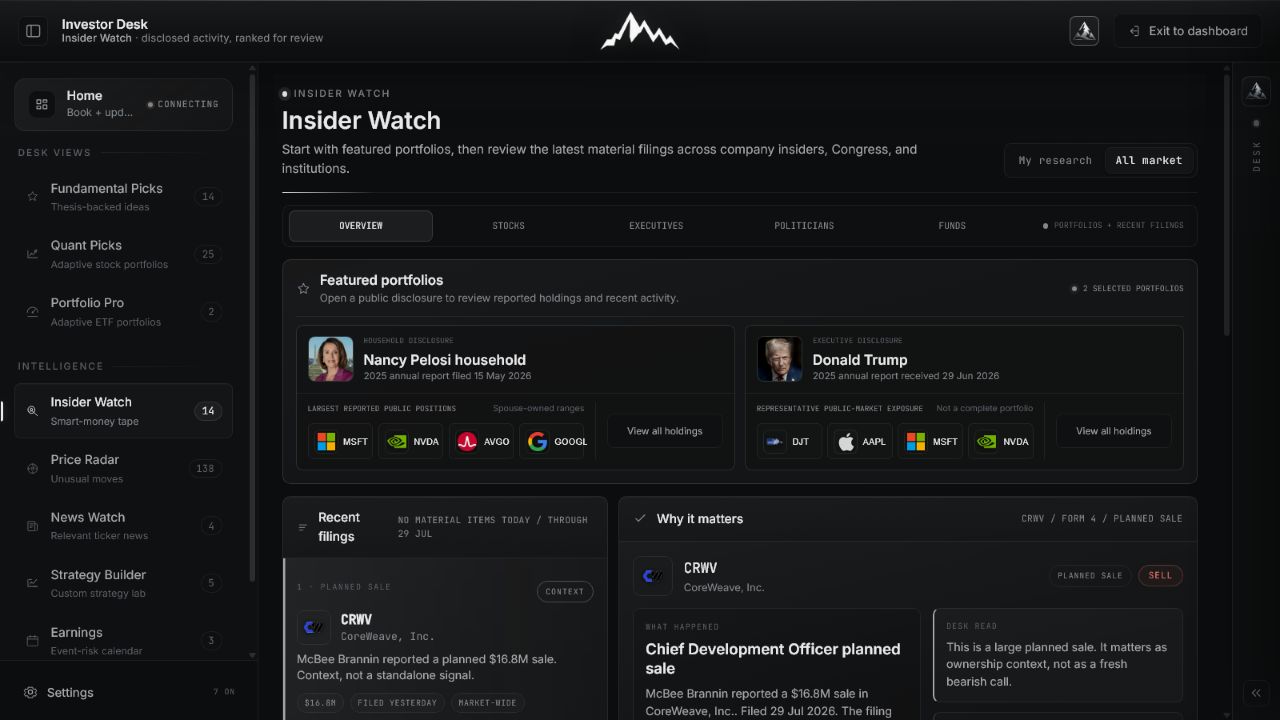
Insider Watch Overview with its five main screen zones marked 12345
Overview screen map. The interface can be quiet when no disclosure meets the materiality threshold.
  1. 01

    Choose the scope

    My research prioritizes names already connected to your Vector Ridge work. All market widens the radar to every covered disclosure.

  2. 02

    Keep Overview selected

    Overview is the daily triage layer. Stocks, Executives, Politicians, and Funds are deeper directories used after something deserves investigation.

  3. 03

    Scan featured portfolios

    High-interest public disclosures provide a fast route into reported holdings and recent activity. They are disclosure snapshots, not live brokerage accounts.

  4. 04

    Review recent material filings

    The queue suppresses routine records and elevates purchases, unusual sales, clusters, ownership changes, delayed reports, and relevant overlap.

  5. 05

    Read why it matters

    Selecting a filing opens the desk interpretation, timing, size, ownership context, coverage tags, and the next research checks without asking you to copy the trade.

Materiality

What earns a place in Overview.

A filing is not important merely because it exists. Overview ranks the information content, timing, transaction pattern, and relevance to work already on the desk.

Signal What it means What raises priority
Open-market insider purchase An officer or director commits personal capital directly. Rises with seniority, size relative to the reported stake, repeated buying, and research overlap.
Multiple-insider cluster Several informed owners change exposure in the same direction. Rises when activity is close in time, open-market, and broad across roles rather than one isolated filing.
Material sale or reduction Reported ownership falls or the selling cadence changes. Rises when the sale is unusually large, repeated, outside an obvious plan, or conflicts with the operating thesis.
Political household disclosure A member of Congress or disclosed household reports a transaction range. Rises with committee relevance, repeated activity, unusual timing, and overlap with a covered company.
Institutional position change A 13F manager reports a new stake, exit, or material concentration change. Rises with portfolio concentration, multiple-manager confirmation, and a meaningful quarter-over-quarter shift.
Vector Ridge overlap The name also appears in Fundamental Picks, Quant Picks, or Portfolio Pro. Rises because the disclosure can affect research already connected to an active model or thesis.

Sources and clocks

Four evidence layers, four different meanings.

Insider Watch brings the sources together without flattening them into one score. Always identify who is reporting, which date anchors the record, what the filing can answer, and what remains unknowable.

Source Who reports Reporting clock What it can answer Critical boundary
Form 4 Officers, directors, and 10% owners Generally filed within two business days Who traded, what changed, when it happened, and reported ownership after the transaction. Awards, exercises, tax sales, and 10b5-1 plans can look meaningful without expressing a fresh discretionary view.
Congress Members and disclosed households Can be reported weeks after the transaction Which security was disclosed, the action, a value range, household attribution, and filing lag when available. Values are ranges, household activity is not always the member's own trade, and the public record is not a live brokerage account.
13F Qualifying institutional managers Quarterly, commonly up to 45 days after quarter-end Selected long U.S. equity holdings, new positions, exits, concentration, and quarter-over-quarter changes. The snapshot is delayed, excludes many asset types and shorts, and can be stale by the time it is public.
Vector Ridge overlap Fundamental Picks, Quant Picks, and Portfolio Pro As each product publishes its current state Whether the disclosed company already matters to a live thesis or adaptive model portfolio. Overlap raises research relevance; it does not turn the public filing into a recommendation or model instruction.

Five-view playbook

Know where to go before you start searching.

Each view answers a different ownership question. Overview prioritizes; Stocks joins the evidence; Executives, Politicians, and Funds preserve the actor-specific record.

01 Overview

What deserves attention now?

Start
Choose My research for relevance or All market for discovery.
Inspect
Featured portfolios, ranked recent filings, the selected activity, and the underlying filing tape.
Leave with
One clear research action: review, investigate, monitor, or no action.
02 Stocks

Who owns or traded this company?

Start
Search the ticker, then read each ownership source on its own reporting clock.
Inspect
Corporate activity, Congress matches, selected institutional changes, the unified timeline, and Vector Ridge overlap.
Leave with
A company-centric ownership map with the evidence gaps made explicit.
03 Executives

What did this officer or director disclose?

Start
Search the actor, company, or ticker; use Buyers and Leadership only as focus filters.
Inspect
Role, transaction type, value, dates, filing lag, post-trade stake, ownership type, and plan context.
Leave with
A point-in-time Form 4 profile and the correct source filing to verify.
04 Politicians

What has this member or household reported?

Start
Search the complete current roster, then open profiles marked with verified disclosures.
Inspect
Chamber, state, household attribution, holdings, transactions, ranges, filing dates, and full source documents.
Leave with
A disclosed portfolio snapshot without inventing exact weights or current balances.
05 Funds

How did this manager's published book change?

Start
Choose a manager and confirm the filing quarter before reading any position change.
Inspect
New positions, exits, adds, trims, reported value, concentration, and disagreement across managers.
Leave with
Quarter-end institutional context to combine with newer evidence, not a portfolio to copy.

Record anatomy

Read the disclosure before reading into it.

Every surfaced item should answer these questions. Missing context is a reason to investigate further, not a reason to invent a conclusion.

01Actor
The executive, director, political household, or institution behind the record.
02Security
The company or fund affected, including the ticker and relationship to the actor.
03Action
Purchase, sale, exercise, award, new position, exit, or ownership change.
04Trade date
When the disclosed transaction occurred, which can differ from the filing date.
05Filed date
When the public record became available; the gap is the filing delay.
06Size
Reported value, value range, shares, or change in ownership, depending on the filing type.
07Context
Direct or indirect ownership, role, transaction pattern, and whether the record is routine.
08Coverage
Overlap with your research, watchlist, Quant Picks, Portfolio Pro, or the wider market.

Profile anatomy

Separate the actor, the filing, and the market path.

Executive and politician profiles keep the transaction and disclosure anchors visible. This prevents a common mistake: judging a delayed public filing as though the actor traded on the day you saw it.

01Identity
Actor name, role, company or political office, and the reporting relationship.
02Activity
Purchase, sale, exercise, award, new position, exit, add, or trim.
03Transaction date
The market-session anchor when a usable trade date is present.
04Filed date
The public-information anchor when the disclosure became available.
05Filing lag
Elapsed time from the underlying transaction to public disclosure.
06Reported stake
Point-in-time shares, value range, or selected position value from the filing.
07Ownership context
Direct, indirect, household, trust, fund, or pre-arranged plan information.
08Market path
Adjusted daily closes around the available anchor dates, shown as context rather than causation.

Review states

Know what the queue is asking you to do.

The state describes the next research action. It is not a buy or sell rating and it does not convert a public filing into a trade signal.

01

Review now

Material, timely, and directly relevant. Open the record and update the connected thesis or position review.

02

Investigate

Potentially meaningful, but the transaction type, size, motivation, or surrounding evidence still needs confirmation.

03

Monitor

Notable enough to retain, but not strong enough on its own to change the current research view.

04

Queue clear

Nothing currently meets the materiality bar. This is a valid output, not a missing recommendation.

Worked interpretations

The filing type changes the conclusion.

The same headline value can mean very different things. Use these patterns to decide what deserves a thesis refresh and what should remain background ownership context.

01

CEO open-market purchase

Signal
Fresh personal capital from senior leadership
Check
Confirm it is an open-market purchase, compare size with remaining ownership, inspect filing lag, and check whether other insiders are buying.
Conclusion
Potentially strong evidence for a thesis refresh; never sufficient alone for a position change.
02

Routine 10b5-1 sale

Signal
A pre-arranged disposal under a disclosed plan
Check
Read the plan context, option exercise, tax treatment, remaining stake, and whether the cadence changed.
Conclusion
Usually ownership context rather than a fresh bearish signal unless size, repetition, or surrounding evidence becomes unusual.
03

Congressional household overlap

Signal
A delayed range-valued transaction in a company already under research
Check
Separate the member from the household actor, compare trade and filing dates, verify the range, and open the source document.
Conclusion
Useful for research prioritization and timing context, not evidence of privileged information or a trade to mirror.
04

Multiple 13F managers adding

Signal
Quarter-end institutional ownership moved in the same direction
Check
Confirm the reporting quarter, concentration, whether positions are genuinely new, and what has changed since quarter-end.
Conclusion
A delayed ownership trend that can support or challenge a thesis when combined with current operating and market evidence.

The complete review routine

Turn disclosure into research, not imitation.

Use the same sequence for corporate, congressional, and institutional evidence. It prevents a famous actor, a large headline number, or a delayed filing from replacing actual research.

  1. 01

    Open Overview and choose My research unless you are deliberately looking for broad-market ideas.

  2. 02

    Read the top-ranked activity and decide whether it is discretionary, routine, delayed, or incomplete.

  3. 03

    Compare transaction date with filed date; never treat the filing date as the trade date.

  4. 04

    Open the Stock map to combine corporate, political, institutional, and Vector Ridge context.

  5. 05

    Open the actor or fund profile and verify role, ownership type, remaining stake, value range, and reporting period.

  6. 06

    Inspect the market path only as context; price action after disclosure does not prove motive or information quality.

  7. 07

    Open the original filing when the record could change a thesis, position size, or review priority.

  8. 08

    Record the research conclusion, mark the item reviewed, and revisit only when new disclosed evidence arrives.

Visual product guide

Seventeen real product captures

Follow the disclosure from radar to ownership context.

These are distinct states from the working product: daily triage, the stock ownership map, live Form 4 profiles, the full Congress directory, disclosed portfolios, 13F managers, and the complete mobile workflow.

01 / Daily radar

Start with what deserves a research review now.

Overview combines featured public portfolios with a ranked filing queue. It can be quiet when no disclosure clears the materiality bar.
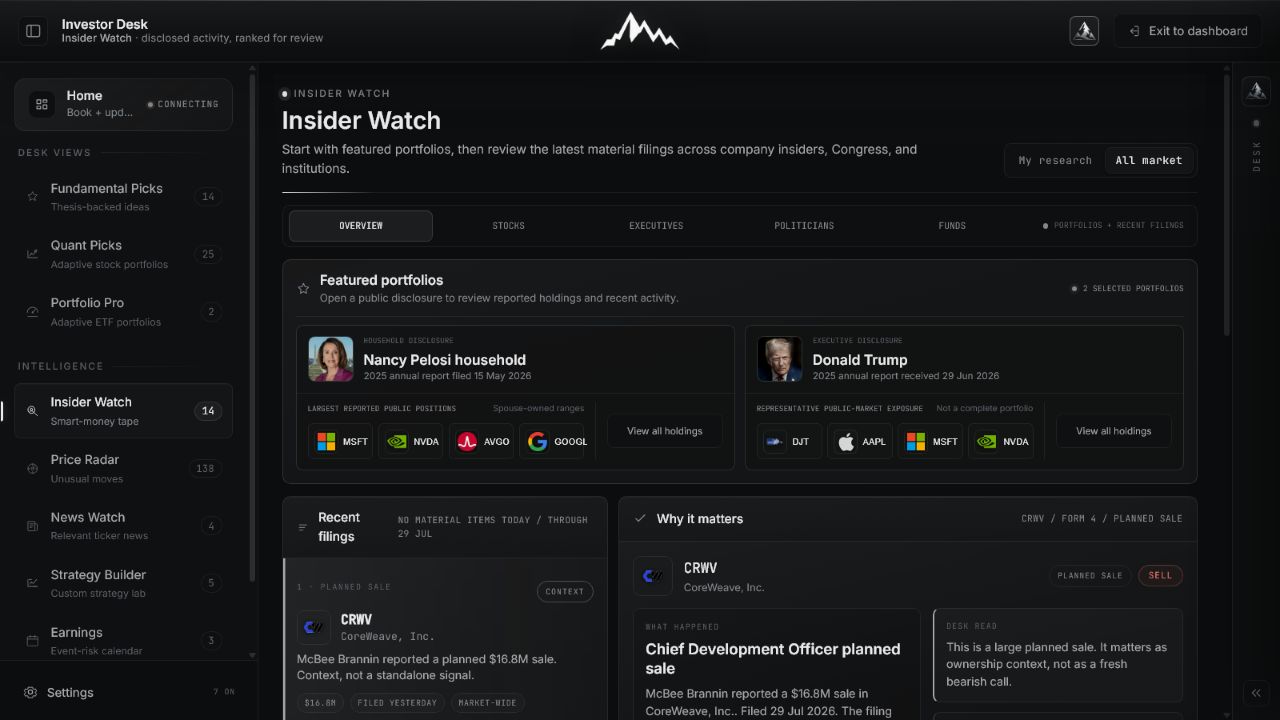
Insider Watch Overview with featured public portfolios and ranked recent filings Open full image
01
Featured portfolios and recent filings

Use the calm front door first: inspect high-interest portfolios, then open only the disclosures that deserve a thesis review.

02 / One stock

Bring every disclosed owner onto one company page.

The ownership map combines corporate insiders, congressional households, selected institutional changes, and Vector Ridge overlap without pretending the sources share the same reporting clock.
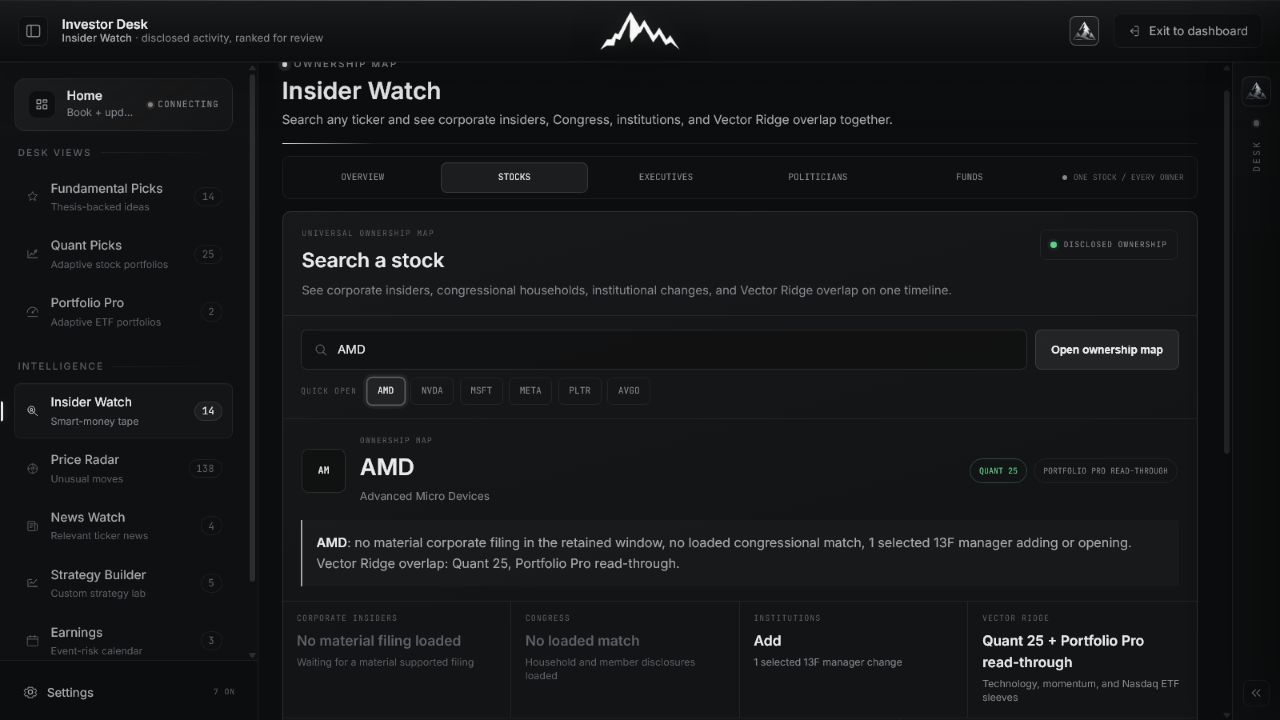
AMD Insider Watch ownership map combining corporate, Congress, institutional, and Vector Ridge context Open full image
02
Universal ownership map

Search any ticker, read each source independently, and use product-overlap tags to route material evidence into existing research.

03 / Corporate insiders

Trace Form 4 activity from the directory to the market path.

The executive workflow preserves role, action, transaction date, filed date, post-trade stake, plan context, filing lag, and the stock path around disclosure.
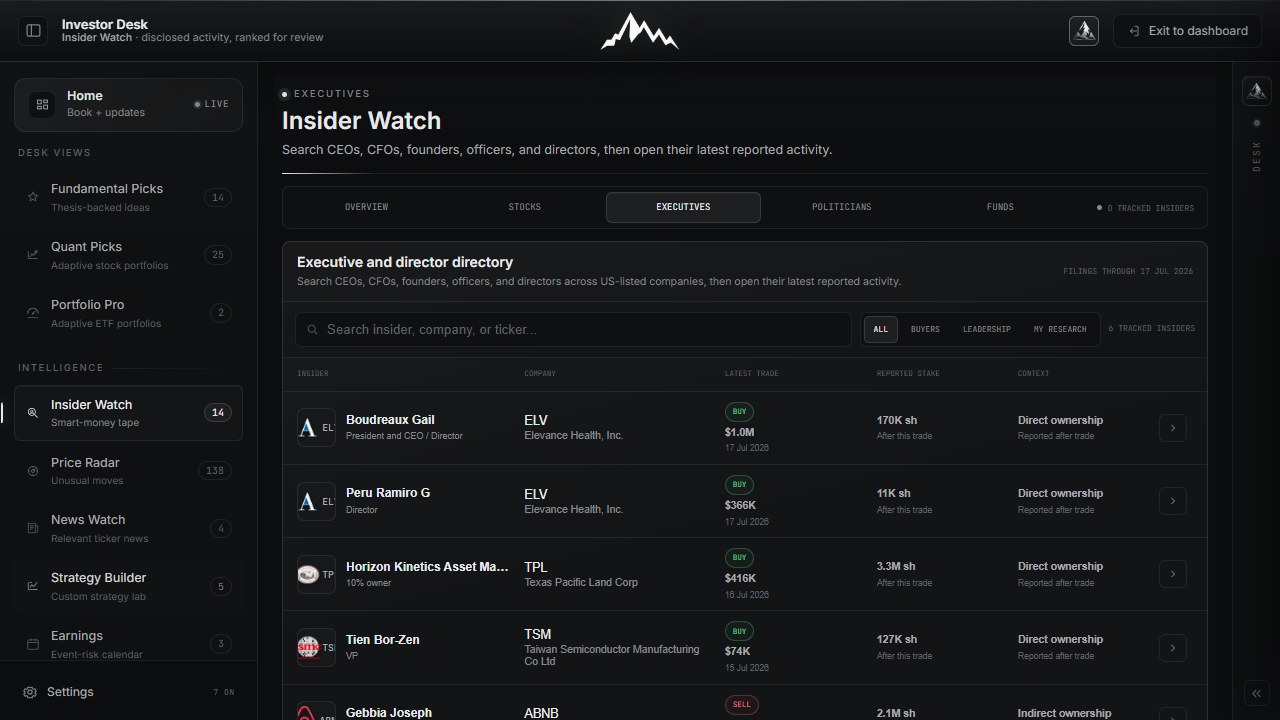
Insider Watch executive and director Form 4 directory Open full image
03
Executive and director directory

Search current officers and directors, then filter for buyers, leadership, or names already connected to your research.
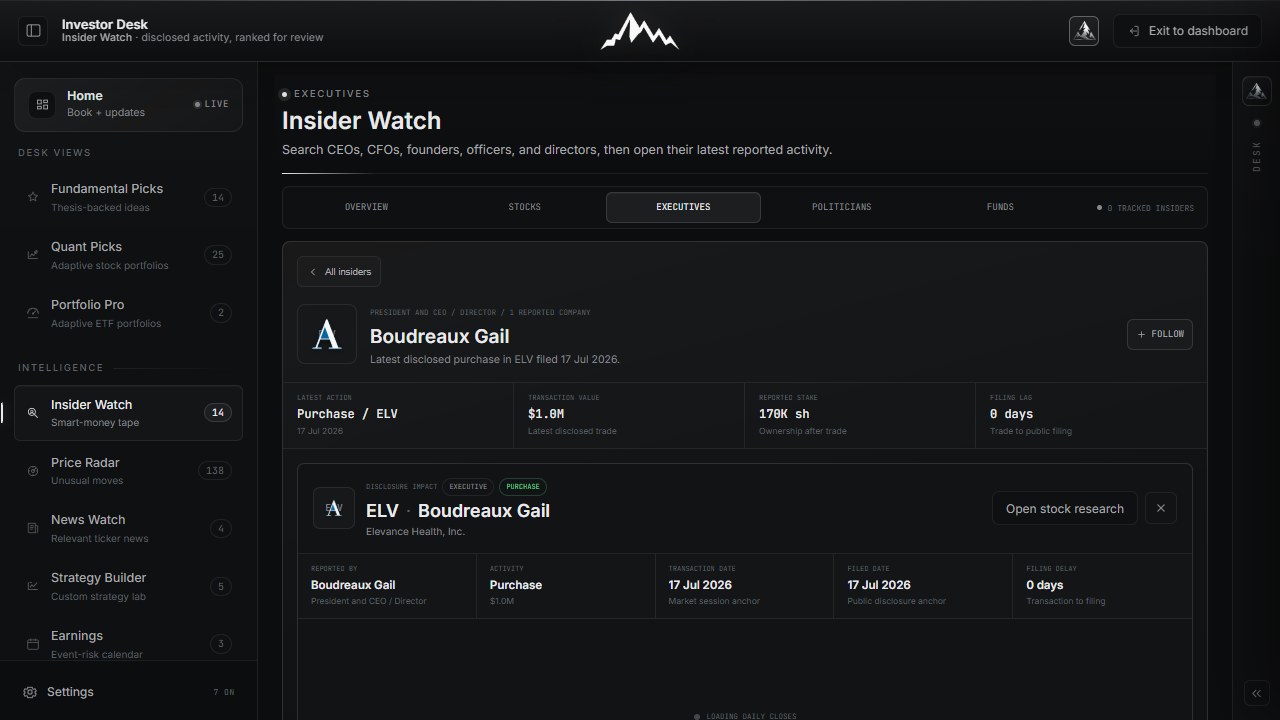
Tien Bor-Zen Form 4 ownership profile with purchase details and filing lag Open full image
04
Point-in-time ownership profile

Separate the transaction from its public filing and verify what the actor still reported owning after the trade.
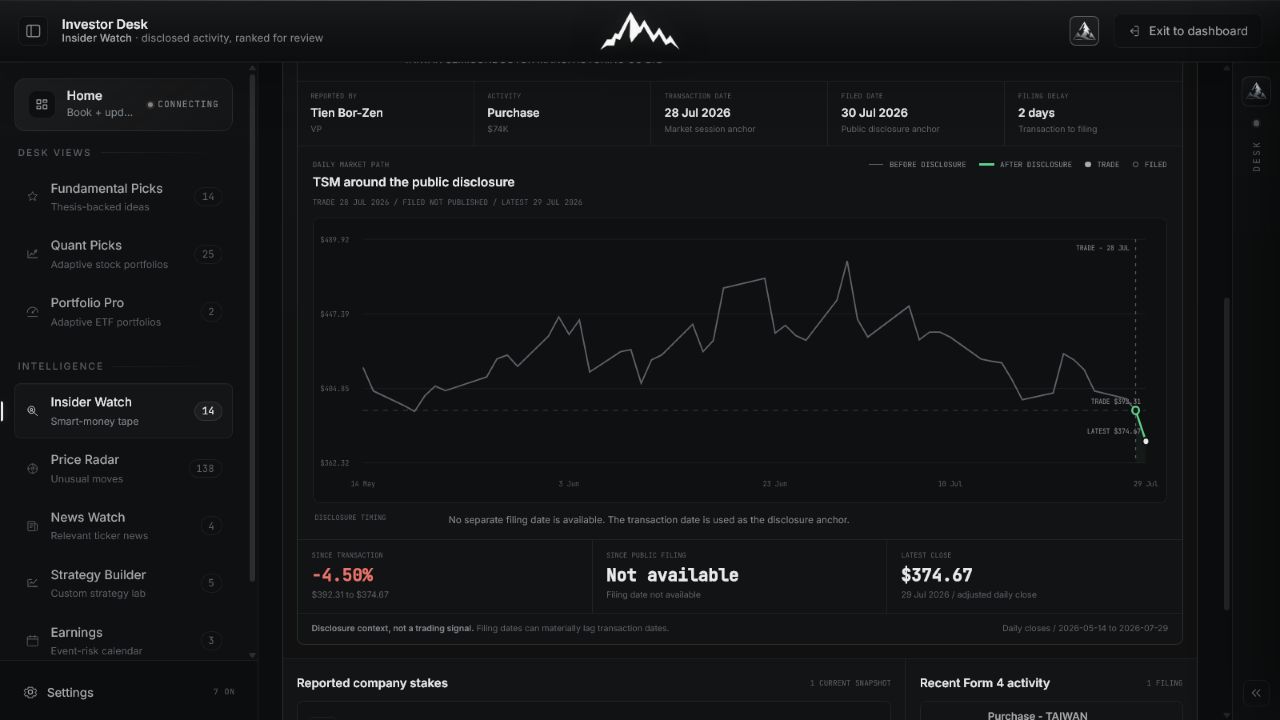
TSM price path around an executive Form 4 transaction and disclosure Open full image
05
Disclosure impact

Compare the transaction anchor, public-filing anchor, and latest close without treating subsequent performance as proof of intent.

04 / Politicians

Search the full roster, then open only verified disclosures.

The directory covers every serving member and delegate. Loaded profiles clearly distinguish verified holdings from people whose public stock records have not yet been added.
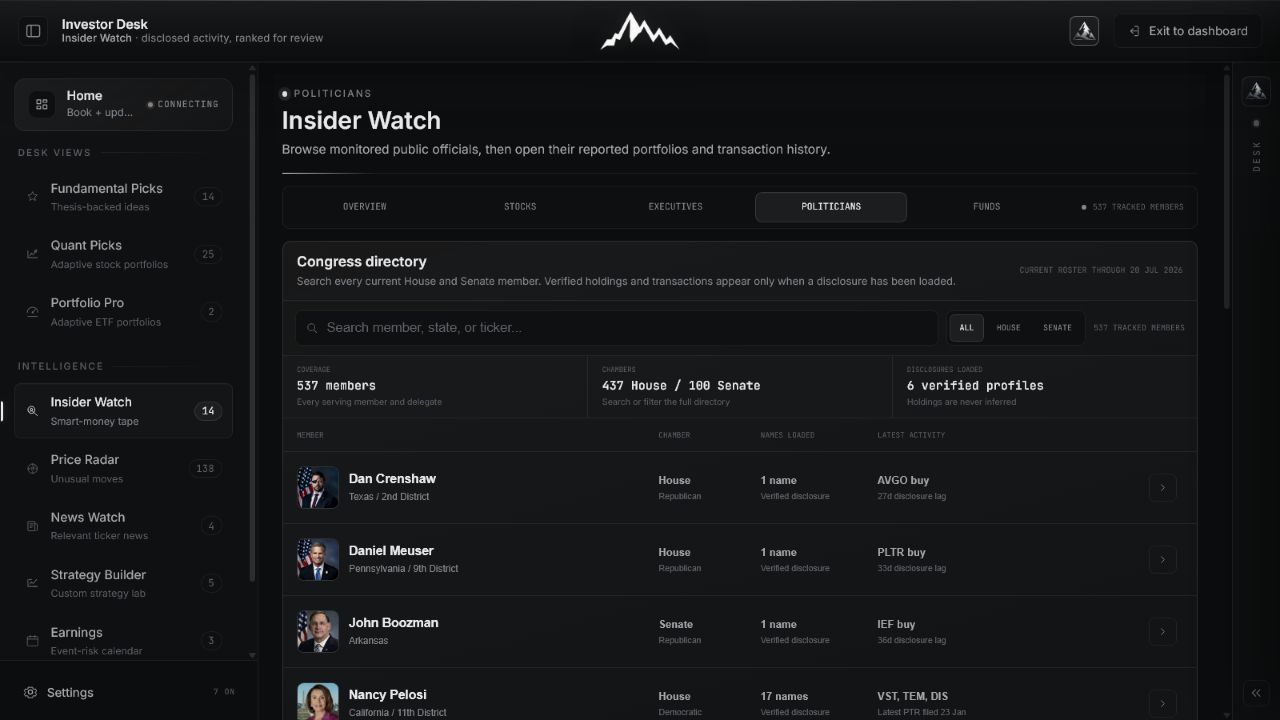
Insider Watch Congress directory with all serving members and disclosure coverage Open full image
06
Full Congress directory

Search 537 current members, filter House or Senate, and see immediately whether a verified stock disclosure is loaded.
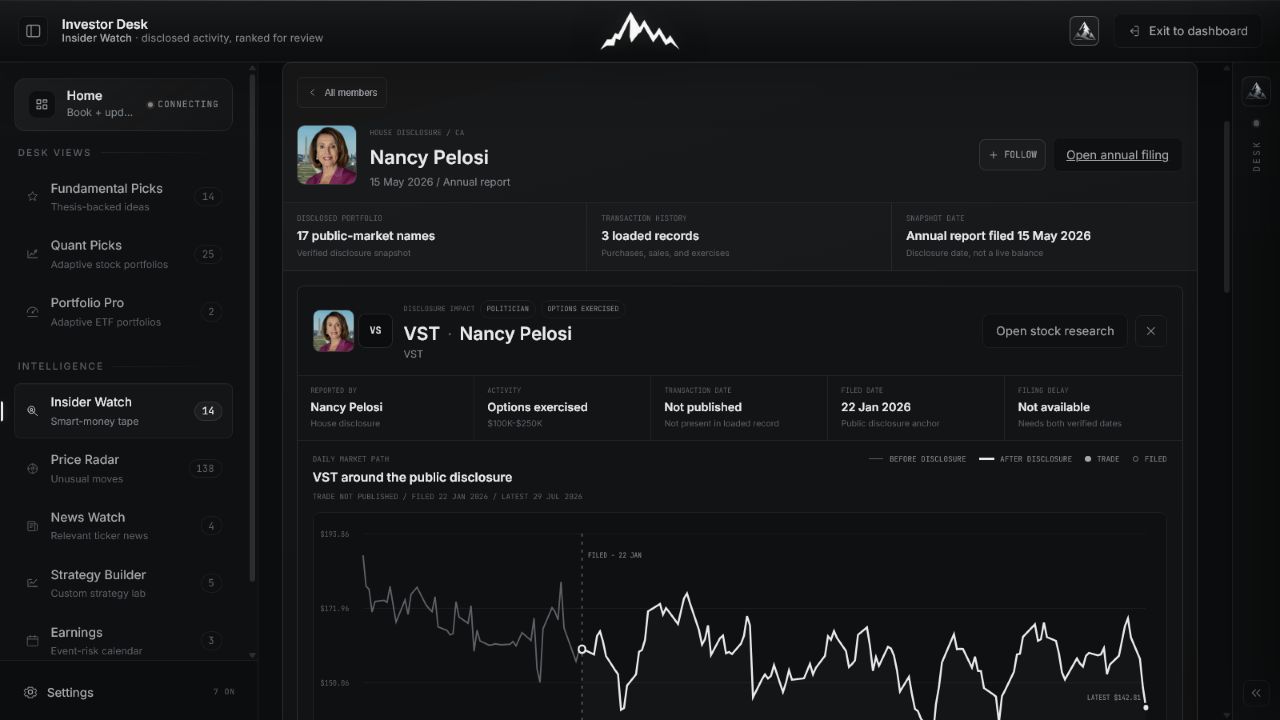
Nancy Pelosi disclosure profile with transaction timing and market path Open full image
07
Filing and market context

Keep transaction date, filing date, value range, household attribution, and the post-disclosure path separate.
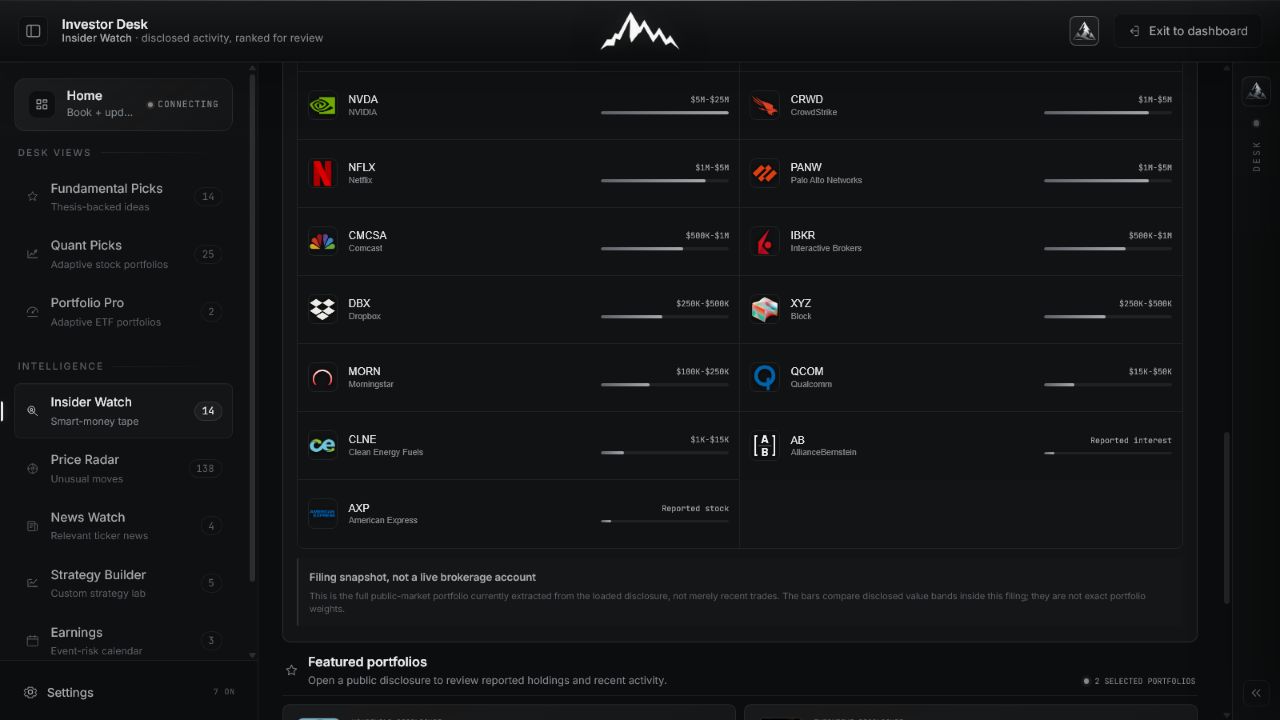
Nancy Pelosi full disclosed public-market holdings snapshot Open full image
08
Complete loaded portfolio snapshot

Review every name extracted from the filing, ordered by disclosed value band rather than an invented live portfolio weight.

05 / Institutions

Read 13F changes as delayed quarter-end evidence.

Funds shows selected managers, reporting quarter, new positions, exits, and material changes. It is deliberately framed as a published snapshot, not a live manager book.
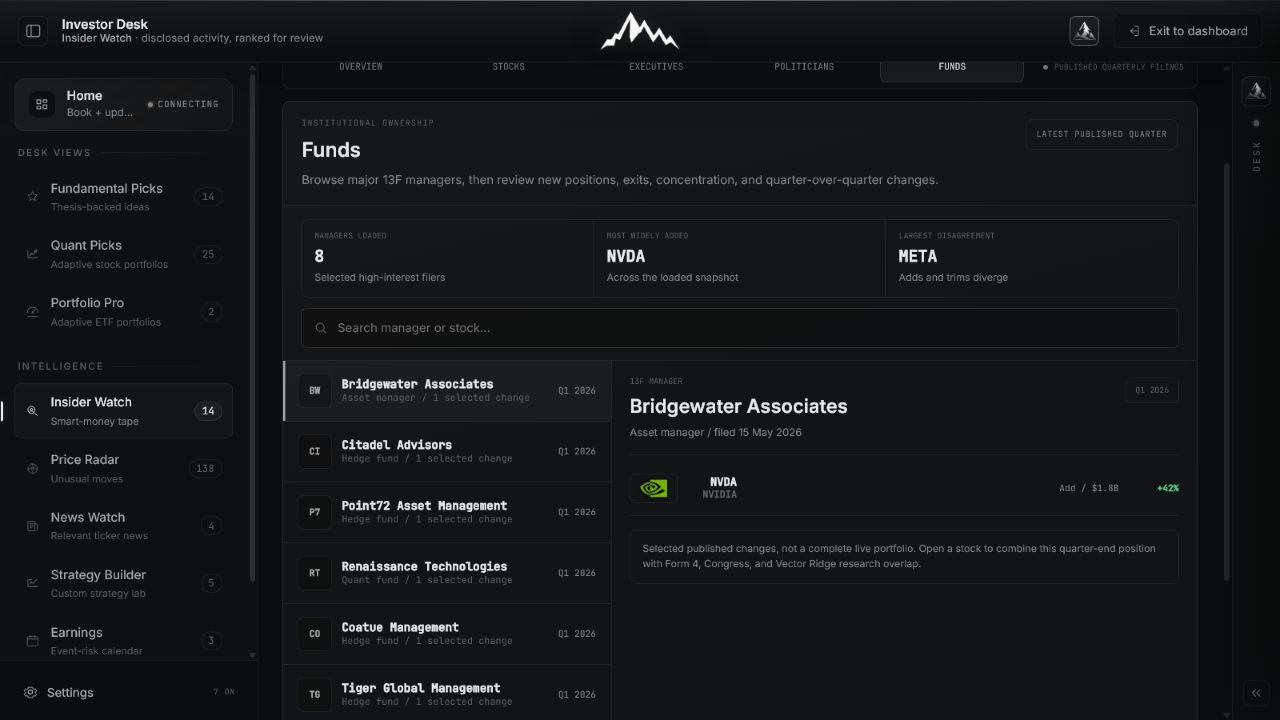
Insider Watch 13F manager browser showing Bridgewater Associates Open full image
09
13F manager browser

Compare managers and open the selected changes from the latest published quarter.
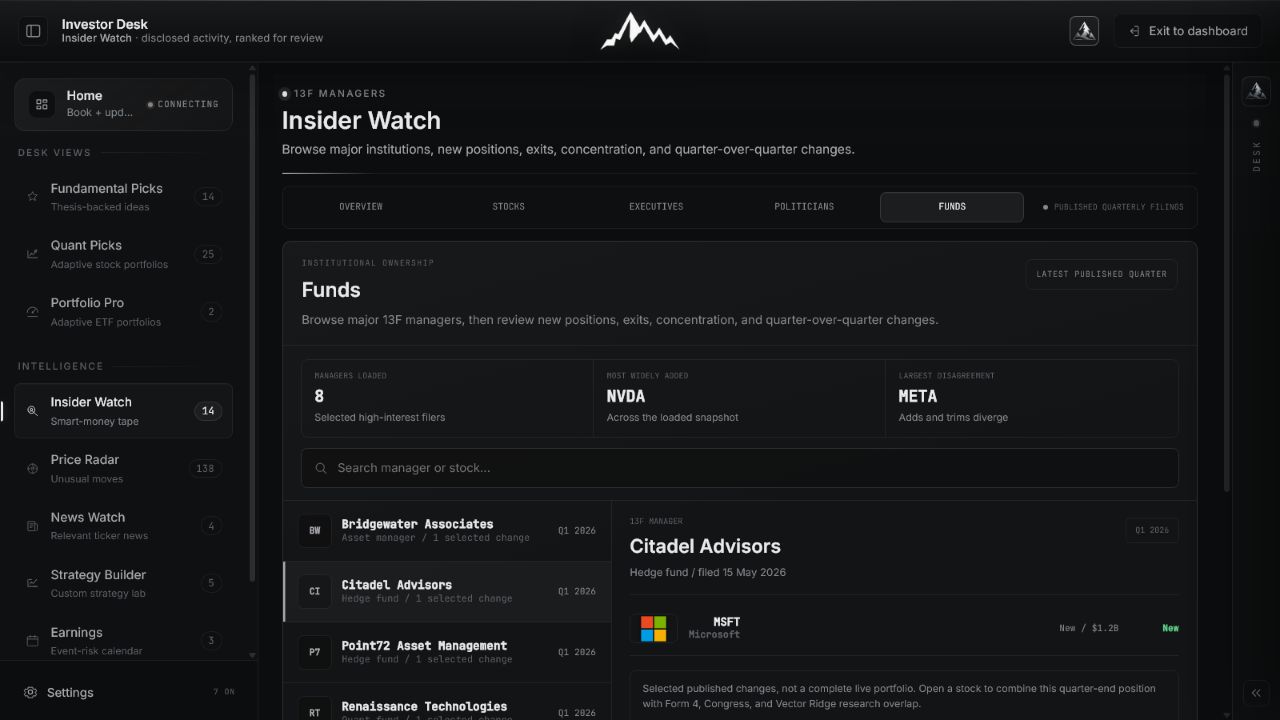
Citadel Advisors selected 13F position change in Insider Watch Open full image
10
One manager, one published change

Read the quarter, filing date, action, value, and change before combining it with newer evidence from other views.

06 / Mobile workflow

Every ownership path remains usable on a phone.

Mobile preserves the same five views and stacks each record into a readable sequence. No horizontal table is required to reach the filing, profile, holdings, or market context.
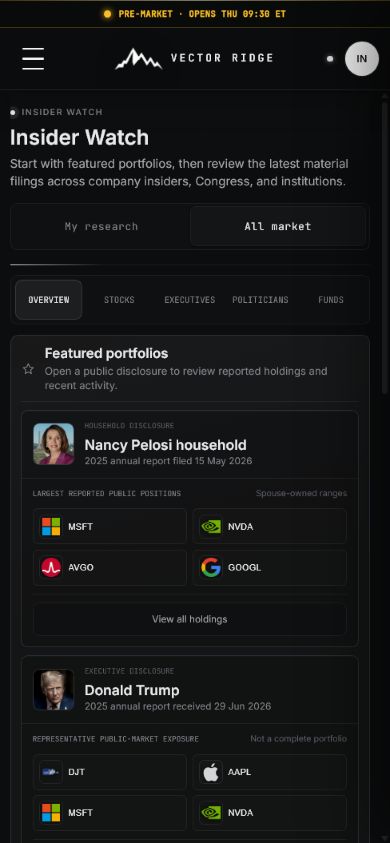
Insider Watch Overview on mobile Open full image
11
Daily radar

Start with featured portfolios and recent material filings.
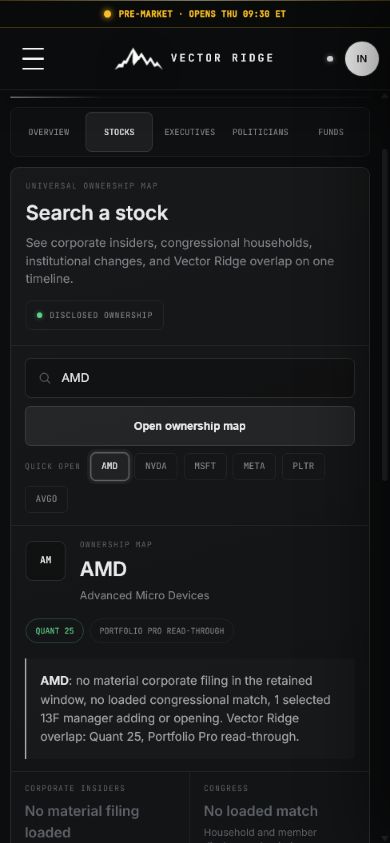
AMD Insider Watch ownership map on mobile Open full image
12
Stock ownership map

Search a ticker and compare every ownership source in one vertical path.
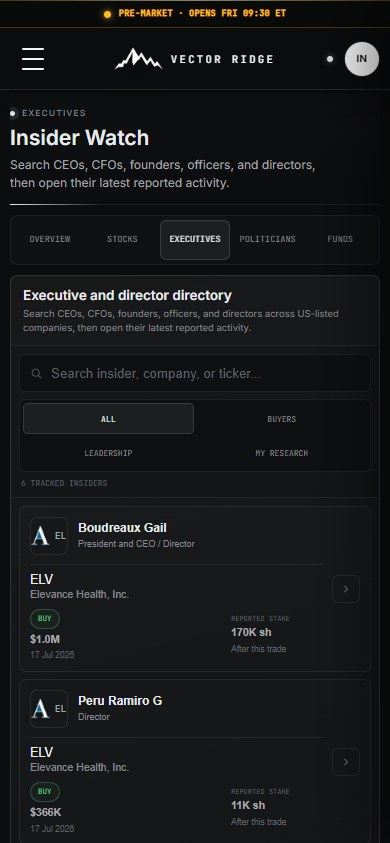
Insider Watch executive directory on mobile Open full image
13
Executive directory

Filter recent Form 4 actors without squeezing a desktop table onto the screen.
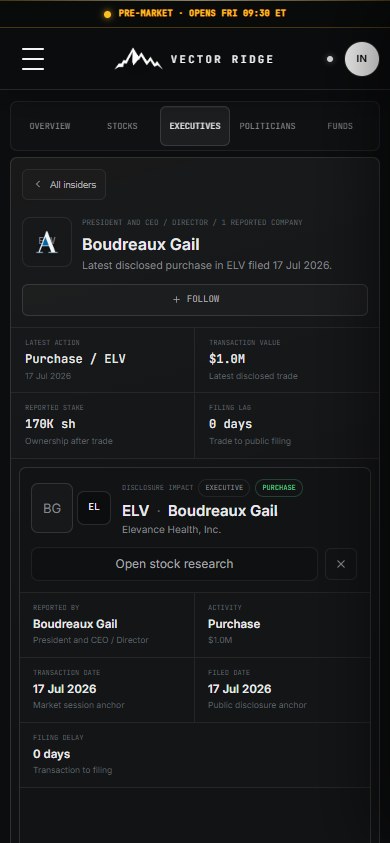
Executive Form 4 profile and disclosure impact on mobile Open full image
14
Executive disclosure

Keep the trade, filing lag, reported stake, and price path together.
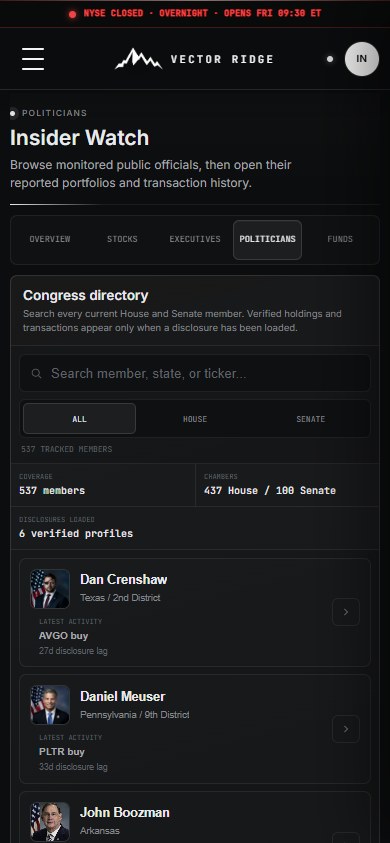
Full Congress directory on mobile Open full image
15
Congress directory

Search every member and identify which profiles contain verified filings.
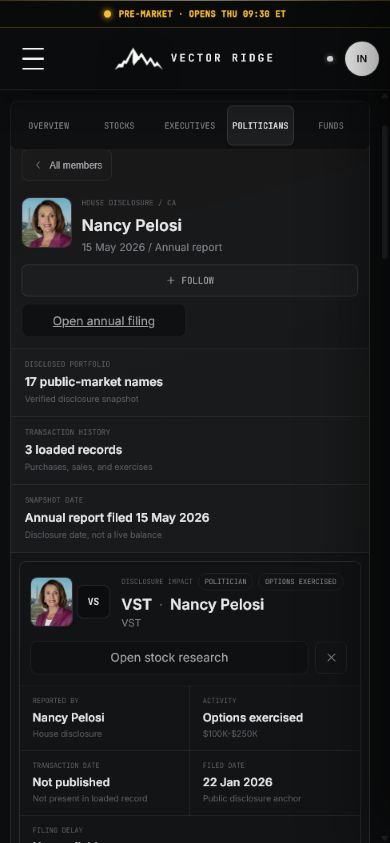
Nancy Pelosi disclosure profile on mobile Open full image
16
Politician portfolio

Open a verified profile and move from filing metadata into holdings and transactions.
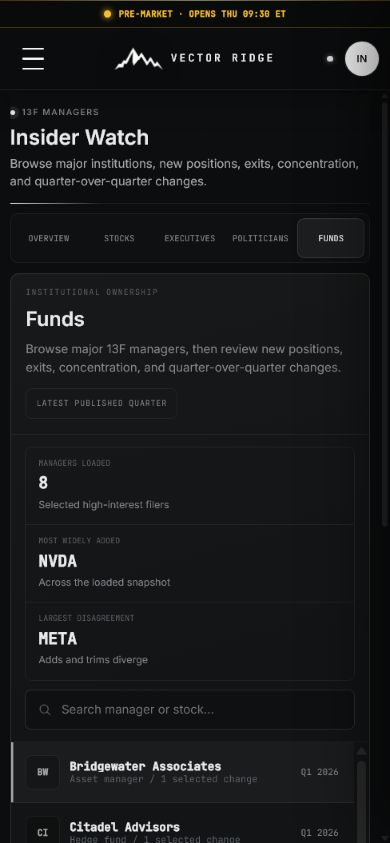
Insider Watch institutional funds browser on mobile Open full image
17
13F managers

Compare the latest published manager changes without losing the reporting-period caveat.

01

How to use it

Follow the ownership trail without copying the trade.

Use the disclosure as a research lead. Confirm who acted, what changed, when it was reported, and whether it overlaps with your existing work.

  1. 01

    Start with Overview

    Review the highest-priority disclosed activity and open only events that could affect a thesis or portfolio decision.

  2. 02

    Switch to Stocks

    Search a ticker to combine Form 4, congressional, institutional, and research-overlap evidence in one place.

  3. 03

    Open a person or fund

    Use Executives, Politicians, or Funds to inspect a disclosed portfolio, history, filing lag, and underlying records.

  4. 04

    Check research overlap

    Tags make it obvious when the company also appears in Fundamental Picks, Quant Picks, or Portfolio Pro.

02

Insider Watch on mobile

Material disclosures surface before directories.

Mobile leads with featured activity and keeps company, executive, politician, and fund views available without flooding the first screen.

  • Start with OverviewReview the highest-priority disclosed activity and open only events that could affect a thesis or portfolio decision.
  • Switch to StocksSearch a ticker to combine Form 4, congressional, institutional, and research-overlap evidence in one place.
  • Open a person or fundUse Executives, Politicians, or Funds to inspect a disclosed portfolio, history, filing lag, and underlying records.
Insider Watch shown in the mobile Investor Desk interface
Current mobile Insider Watch screen.
03

Example workflow

Example: a CEO purchase in a held stock

The filing is evidence to review, not a trade to copy.

01

Open the ranked purchase

02

Confirm transaction type, size, ownership, and filing lag

03

Check the stock ownership timeline and research overlap

04

Update the thesis only if the new evidence is material

04

Updates and boundaries

Public filings arrive on different clocks

Corporate, congressional, and institutional disclosures have different deadlines and can lag the underlying transaction. Insider Watch keeps both transaction and filing dates visible.

Corporate insiders As eligible Form 4 filings are processed
Politicians As public transaction disclosures are published
Institutions After quarterly 13F filings become available
Research overlap As Vector Ridge lists and portfolios update

Ready to use Insider Watch?

Open Insider Watch.

Use Insider Watch with its current data, controls, and saved account context.