Names can enter, leave, and resize
The monthly model rebuilds the portfolio from the current ranking, so the roster is not presented as a permanent list of favorite stocks.
 Vector Ridge
Adaptive stock portfolios
Follow a portfolio that can change as the model changes.
Quant Picks turns a broad eligible universe into two transparent adaptive portfolios: a concentrated, score-weighted Top 25 and a broader, equal-weighted Top 100.
Inside Quant Picks
Construction, rebalance changes, and current weights explain the model portfolio before any individual holding is opened.
Select a numbered point to trace the screen.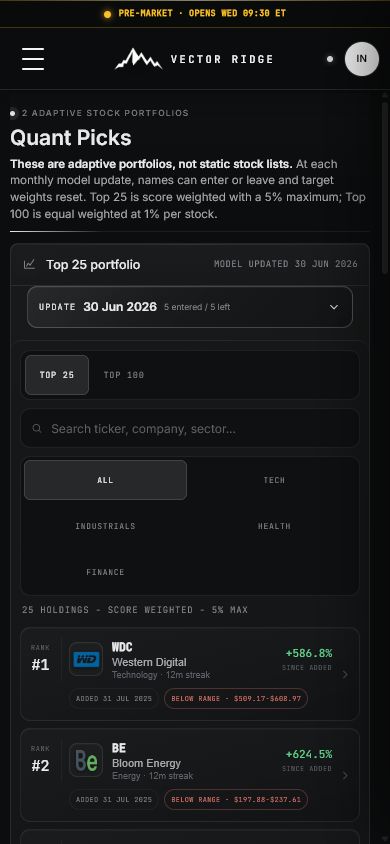
Why Quant Picks
Quant Picks publishes the dated portfolio, the construction rules, and every rebalance change instead of showing an unexplained score list.
The monthly model rebuilds the portfolio from the current ranking, so the roster is not presented as a permanent list of favorite stocks.
Top 25 uses score-weighted positions with a 5% maximum; Top 100 offers a broader equal-weight implementation.
Effective dates, entries, exits, continuing names, target weights, and since-added history make each rebalance traceable.
Complete portfolio manual
Quant Picks publishes two adaptive equity portfolios. The Top 25 concentrates the strongest current ranks with capped score weights; the Top 100 spreads exposure equally across a broader ranked sleeve.
Product map
Move through the product in order. Each view has a distinct job and should not be used as a substitute for the next one.
Which 25 names rank highest and what capped weight does each receive?
Which 100 names qualify for the equal-weight portfolio?
Which companies entered, left, or remained at the dated update?
What is the current rank, weight, tenure, range, and relevant company context?
Screen anatomy
The field, its meaning, and the decision it supports remain separate. This prevents a rank, forecast, range, or headline result from carrying more authority than it should.
The company's relative position in the current eligible universe.
Use it inside the current model date; do not compare it with a fundamental grade.
The numeric output used to order eligible names.
Use it to understand relative ordering, not as an expected return.
The portfolio weight assigned by the selected construction.
Implement the full roster and its caps rather than isolated favorites.
The effective portfolio entry date for the current run.
Use it to distinguish model tenure from the date you personally begin following.
Consecutive monthly appearances in the broader ranked sleeve.
Treat persistence as context, not a promise that the name remains next month.
Marked performance from the displayed model-entry date.
Do not substitute it for total portfolio performance or a forecast.
Independent current market context for the stock.
Use it to locate price; it does not change the monthly rank or target weight.
The dated record of entries, exits, and held names.
Use it to reconcile the prior portfolio with the new one before implementation.
Interpretation states
A product state should lead to a specific research action, including the decision to do nothing when no new evidence deserves attention.
Repeatable workflow
The routine keeps the product useful after the novelty disappears. It also leaves a clearer record of what was known, what changed, and why a decision followed.
Choose Top 25 or Top 100 according to the intended concentration and weighting method.
Confirm the model date, holding count, construction, and maximum position rule.
Open the rebalance receipt and verify that every entry is reconciled with an exit when the roster size is fixed.
Compare prior and new target weights across the complete portfolio.
Use company detail only to understand rank, tenure, overlap, range, and current evidence.
Record taxes, spreads, unavailable names, and execution timing that can make a real account differ from the model.
Keep the published roster until the next dated monthly rebalance replaces it.
Plain-English glossary
Seven real product captures
These states show the concentrated Top 25, broader Top 100, dated entries and exits, and the expanded company view on desktop and mobile.
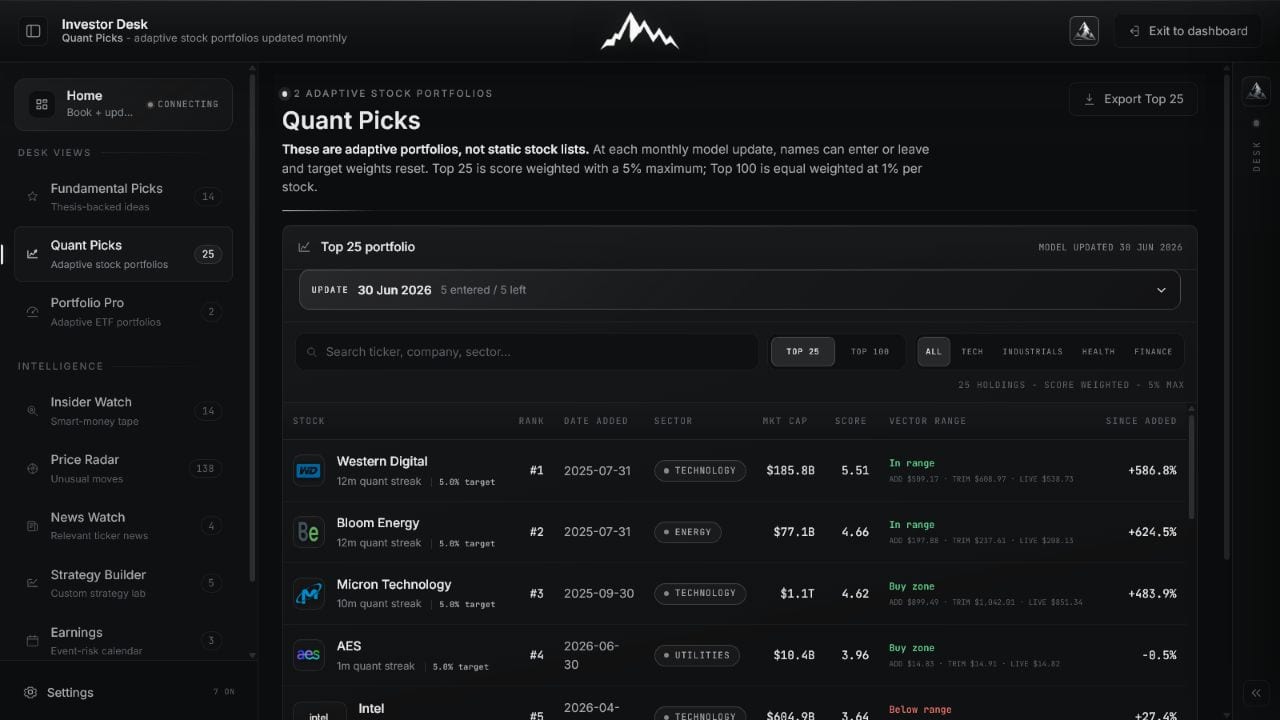
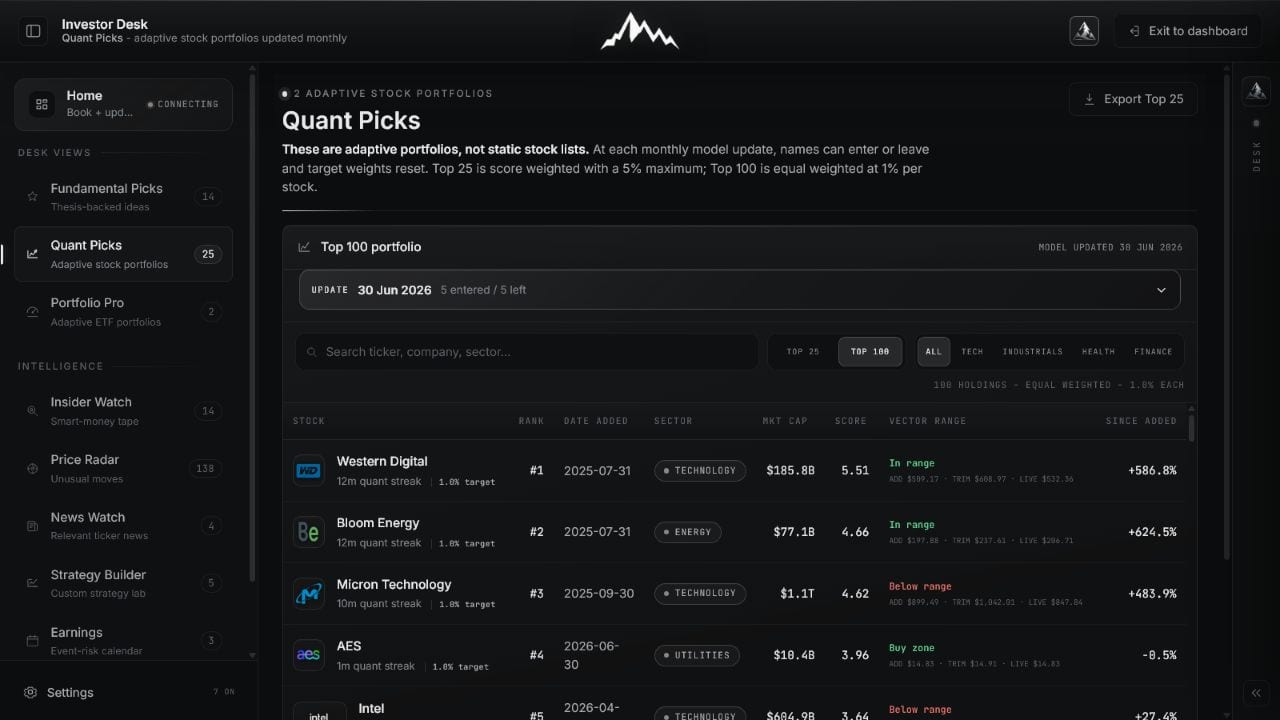
Top 25 is score weighted with a published cap. Top 100 is equal weighted for broader exposure. Each is a complete portfolio with its own construction.
 Open full image
Read rank, target weight, date added, sector, model score, market context, and since-added return.
 Open full image
Use the broader equal-weight portfolio when concentration is not the intended implementation.
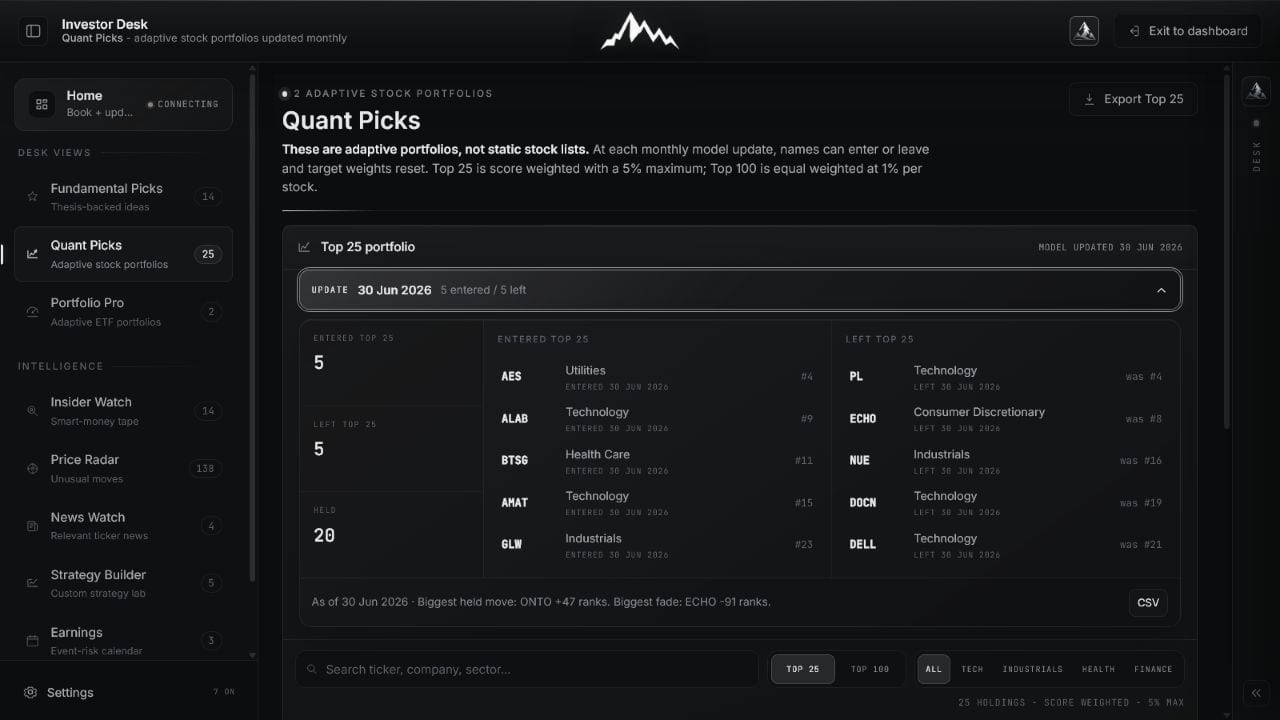
The dated update records names entering, names leaving, and names held. It makes the portfolio transition inspectable rather than presenting a mysterious new list.
 Open full image
Confirm the model date and reconcile the old roster with the new roster before using target weights.
The expanded company view keeps current rank, target weight, entry date, streak, independent Vector Range context, and relevant updates together.
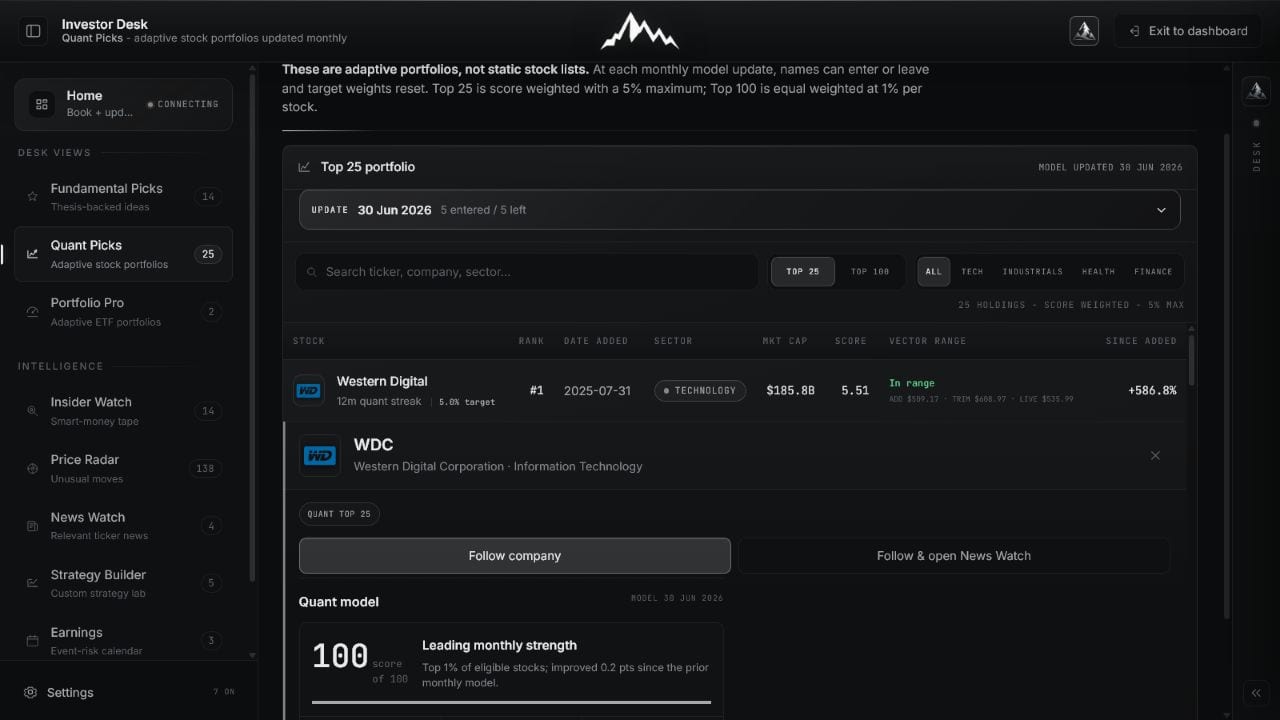 Open full image
Use company context to understand the position; the monthly model roster remains the portfolio authority.
Mobile stacks the same evidence into a clear sequence without turning the roster into a sideways desktop table.
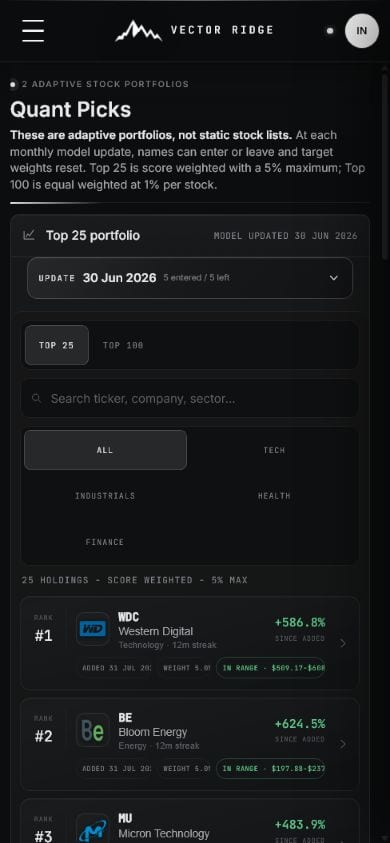 Open full image
Choose Top 25 or Top 100 and scan the current holdings.
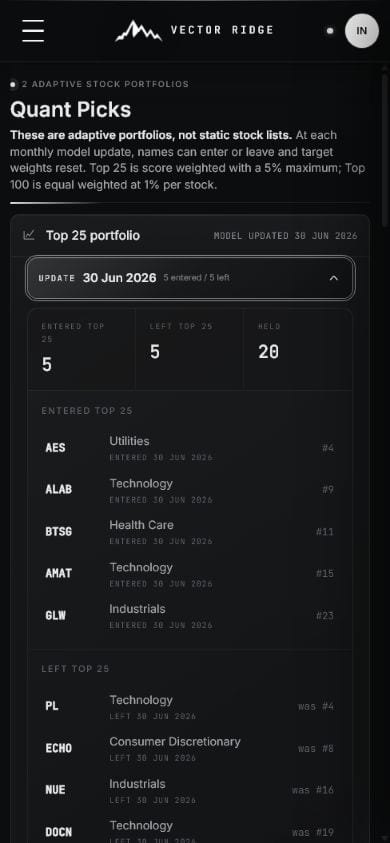 Open full image
Review entries and exits against the same effective date.
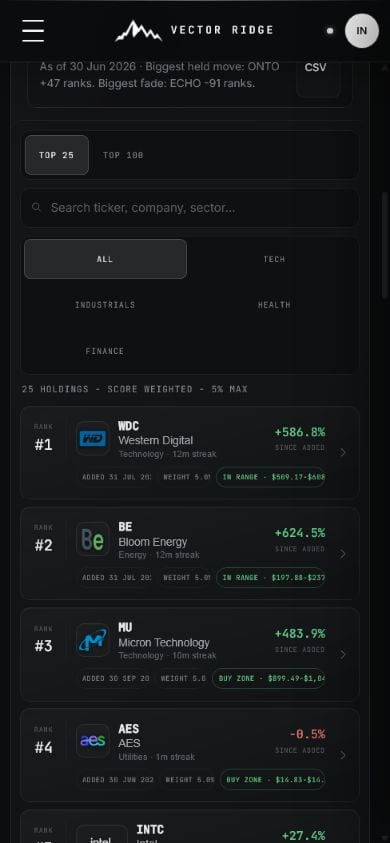 Open full image
Continue into rank, weight, range, and relevant updates.
How to use it
Choose the model, confirm its construction and effective date, then review entries, exits, and target weights together.
Use Top 25 for the concentrated action list and Top 100 for a broader systematic portfolio.
Confirm the weighting method, maximum position size, number of holdings, and next rebalance date.
Sort or filter the holdings, then use rank, weight, date added, and model streak to understand each position's role.
Open the row for quant history, current target weight, news, fundamental overlap, and available Vector Range context.
Quant Picks on mobile
Mobile prioritizes model date, construction, current rank, target weight, and entry history without turning the portfolio into a static watchlist.
Example workflow
The portfolio is the roster and weights published for that model date, not a permanent stock list.
Check the model update date
Review entries and exits together
Confirm every target weight
Use the current roster until the next published rebalance
Updates and boundaries
The model reranks the eligible universe on its monthly cycle. Holdings, order, and target weights can change, so the dated roster is the current portfolio authority.
Ready to use Quant Picks?
Use Quant Picks with its current data, controls, and saved account context.